Biomechanic Shaders
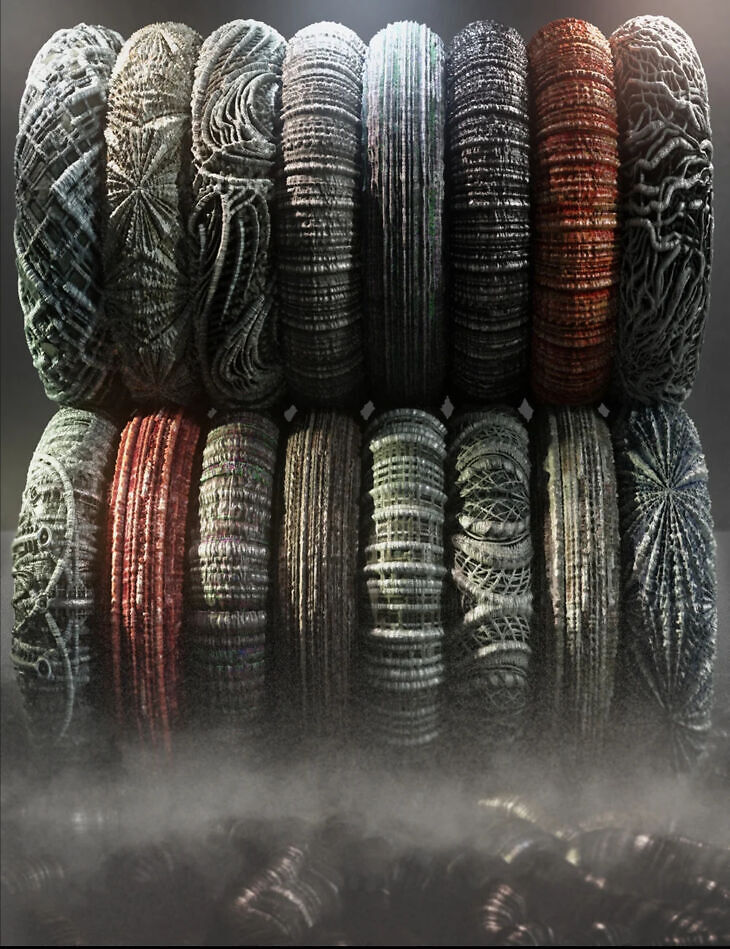
From Marshian comes Biomechanic Shaders, a lighting and shader set available on Daz 3D. Inside the archive you get 62 items, including Biomechanic Shaders 16 Shader Presets BMS Angles, BMS Circle Blue, BMS Circle Gray.
Biomechanic shaders are perfect for your fantasy, science fiction, anime, horror, and alien scenes. There are 4-6 texture maps for each preset that bring the mix of mechanical and biological surfaces to life. The 16 presets can be adjusted in a variety of ways on props, architecture, geoshells, and figures. Several presets are rotated 90 deg; so you can add variety and find a good match for your prop or figure UVs.
The set also includes 44 shader utilities that can also be used on other Iray Uber surfaces. Be sure to experiment with displacement and SubD Levels, as those presets and manual adjustments can really add other-worldly dimension to the surfaces of higher poly models.
What’s included
- Biomechanic Shaders 16 Shader Presets BMS Angles
- BMS Circle Blue
- BMS Circle Gray
- BMS Grid
- BMS Random
- BMS Ribs
- BMS Rows Gray
- BMS Rows Gray90
- BMS Rows GrayDark
- BMS Rows GrayDark90
- BMS Rows Green90
- BMS Rows Purple
- BMS Rows Red
- BMS Rows Red90
- BMS SansPattern
- BMS Sphere
- 44 Shader Utilities Presets BMS Utility Angle 180
- BMS Utility Angle 90 (default)
- BMS Utility Bump High
- BMS Utility Bump Low
- BMS Utility Bump Medium
- BMS Utility Diffuse Strength High (Default)
- BMS Utility Diffuse Strength Low
- BMS Utility Diffuse Strength Medium
- BMS Utility Displacement High
- BMS Utility Displacement Low
- BMS Utility Displacement Medium
- BMS Utility Displacement Off
- BMS Utility Dual Lobe Specular Off
- BMS Utility Dual Lobe Specular On
- BMS Utility Glossy and TopCoat Off
- BMS Utility Glossy and TopCoat On
- BMS Utility Glossy High
- BMS Utility Glossy Low
- BMS Utility Glossy Medium
- BMS Utility Normal Map Low
- BMS Utility Round Corners Off
- BMS Utility Round Corners On
- BMS Utility SubD 0
- BMS Utility SubD 2
- BMS Utility SubD 4
- BMS Utility SubD 6
- BMS Utility SubD 8
- BMS Utility Tile 10X10
- BMS Utility Tile 6×4
- BMS Utility Tiling 12×12
- BMS Utility Tiling 15×15
- BMS Utility Tiling 1×1
- BMS Utility Tiling 20×20
- BMS Utility Tiling 3×3
- BMS Utility Tiling 4×4
- BMS Utility Tiling 6×6
- BMS Utility Tiling 8×8
- BMS Utility TopCoat High
- BMS Utility TopCoat Low
- BMS Utility TopCoat Medium
- BMS Utility Translucency High
- BMS Utility Translucency Low
- BMS Utility Translucency Medium
- BMS Utility Translucency Off
- … and 2 more items in the archive.
Specifications
- Source: Daz 3D
- File format: DUF
- Software / install: Daz Connect DIM Manual Install
- SKU: 90268
- Artist: Marshian
Download links for 7 mirrors are listed below.