UV Tailor
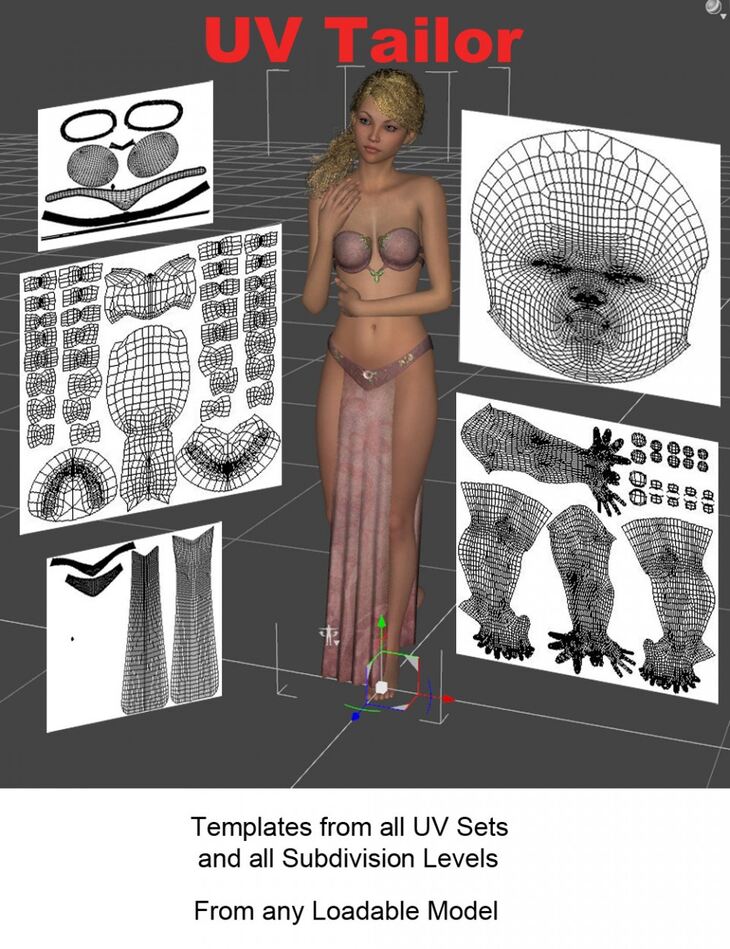
Greenbriar Studio released UV Tailor on Daz 3D. It contains 5 files; the list begins with View / Print all uv sets, not only the one currently in use by the loaded model, but all the sets available on the newer Genesis models, View / Print all Subdivision levels. Subdivision slightly changes uvs as they are smoothed in the Subdivision process. UV Tailor lets you check your textures against the generated high res uv maps., Correctly works with the new Genesis 3 non overlapping uv layouts..
UV Tailor is a plugin for DAZ Studio 64 bit Windows that allows you to view and print the uvs for any model.
This allows you to create new textures for existing models, matching them to the uv set used by that model. Plus it allows you to create textures for new models that you have created uvs for.
It allows you to see how your uvs and textures will be affected by the subdivision process so you can make sure they will map correctly at the highest subdivision level.
What’s included
- View / Print all uv sets, not only the one currently in use by the loaded model, but all the sets available on the newer Genesis models
- View / Print all Subdivision levels. Subdivision slightly changes uvs as they are smoothed in the Subdivision process. UV Tailor lets you check your textures against the generated high res uv maps.
- Correctly works with the new Genesis 3 non overlapping uv layouts.
- Scriptable from DAZ Script so you can automate the selection of surfaces, uv sets, subdivision levels and export of uv images.
- .PDF Manual
Specifications
- Source: Daz 3D
- Software / install: Daz Connect DIM Manual Install
- SKU: 24507
- Artist: Greenbriar Studio
It is available through 3 mirrors. Registration is free and takes a moment.