Apex Executive Pro – Chair Figure for Daz Studio
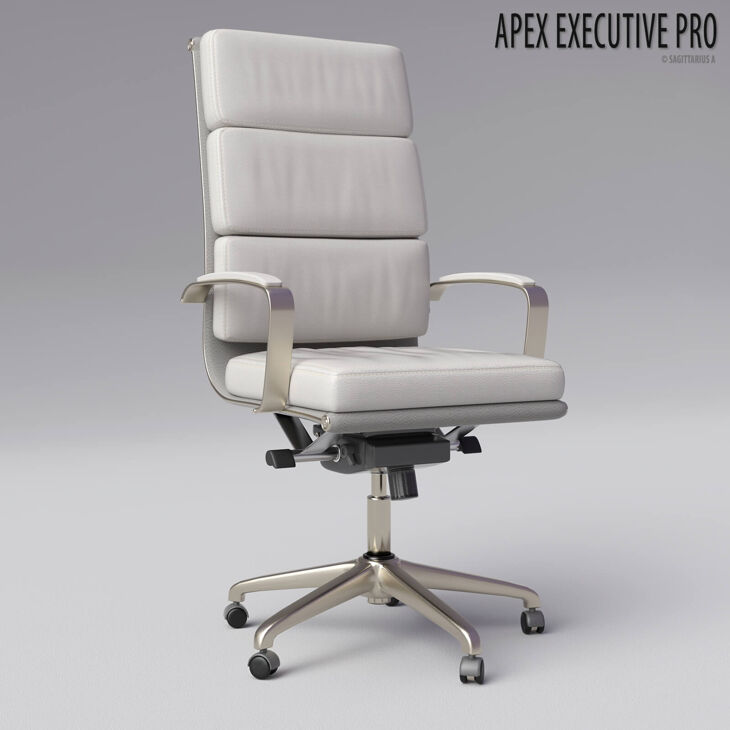
Sagittarius A released Apex Executive Pro – Chair Figure for Daz Studio on RenderHub. The package is distributed through the download mirrors below.
************************************************************
*Product Name: Apex Executive Pro – Chair Figure For Daz Studio
*Copyright 2026 by Sagittarius A
*Contact me via Renderhub Sitemail
************************************************************
System Requirements:
PC/MAC, Daz Studio 4.15 or up with iray
——————————————————————————————————————————————————————————-
Apex Executive Pro is a high-quality, fully detailed executive chair model for DAZ Studio, designed for maximum versatility and customization.
——————————————————————————————————————————————————————————-
Included In This Package:
01 QUALITY CHAIR FIGURE FOR DAZ STUDIO
10 FULL MATERIAL PRESETS
10 PARTIAL MATERIAL PRESETS FOR SEAT BASE
LOTS OF TRANSFORMING AND DEFORMING MORPHS
01 ZERO POSE FOR CHAIR FIGURE
————————————–
INSTALLATION INSTRUCTIONS:
Unzip into your Daz Studio Content directory; make sure “use folder names” option is checked.
————————————–
I would like to read your reviews!!!
———-
USAGE!
Expand your library: Props: Apex Executive Pro: and double click “Apex Executive Pro” icon.
Chair figure will be loaded into scene without any textures.
“Zero Form” – This pose will reset all morphs and transformations
————
Apply desired material.
Select “Apex Executive Pro” figure in the scene
Expand your library: Props: Apex Executive Pro: Materials: and double click any material icon.
————
Adjusting and transform the Chair
Expand “Apex Executive Pro” figure in the scene (Right click – Expand – Expand All)
By clicking at any Chair parts you will see all available transformations in “Parameters” tab.
For example by clicking at “GasLift” part you will see Y Translate, Y Rotate, Scale, Up – Down dials. *
For example by clicking at “Chair” part you will see Chair Bend, Chair Rotate, Chair Scale and X,Y,Z Scale dials. *
* Ignore hidden dials
————
Adjusting Morphs
Select “Apex Executive Pro” figure in your scene
Go to “Parameters” tab
Click “Chair Morphs”
You will see 10 Morphs available for use
———-
That’s All! 🙂 Have a great renders!
Ownership Statement:
All of this product’s content was created by Sagittarius A
————————————–
Information about Usage Rights:
You can use this product freely in any kind of renders, commercial or non commercial.
You are not allowed to share this file or any parts of it on a peer to peer network for other people to download.
You are not allowed to use any part of this product for your own commercial products.
You are not allowed to give it away as a gift.
The content of this package may not be redistributed, sold, or copied in any way.
————————————–
Thank you so much for purchasing this product! If you need – contact me via renderhub sitemail (Sagittarius A) for help.
Have fun and enjoy your renders! I would like to read your reviews 🙂
Specifications
- Source: RenderHub
- File format: Daz Studio DUF
- Software / install: Daz Studio
- SKU: 381973
- Artist: Sagittarius A
It is available through 7 mirrors. Registration is free and takes a moment.