Bone Minion Batch Converter for Genesis 8 Poses
From RiverSoft Art comes Bone Minion Batch Converter for Genesis 8 Poses, a tool for Genesis 2 Male, Genesis 3 Female, Genesis 3 Male, Genesis 9, Michael 4, Victoria 4, Genesis, Genesis 2 Female, available on Daz 3D. The download holds 13 items, among them Bone Minion Batch Converter for Genesis 8 (.DSE,.DSA) Bone Minion Batch Converter Install Custom Actions Script, Bone Minion Batch Converter Genesis 8 Script, Detailed User Guide (.PDF).
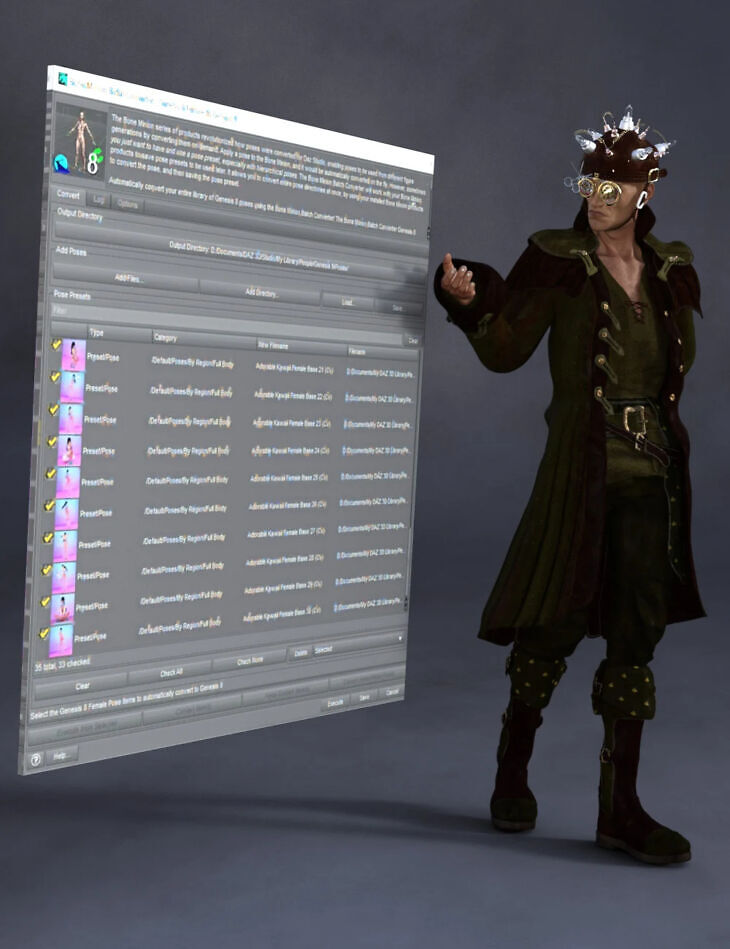
The Bone Minion series of products revolutionized how poses were converted for Daz Studio, enabling poses to be used from different figure generations by converting them on-demand. Apply a pose to the Bone Minion, and it would be automatically converted on the fly. However, sometimes you just want to have and use a pose preset, especially with hierarchical poses. The Bone Minion Batch Converter will work with your bone minion products to save pose presets to be used later. It allows you to convert entire pose directories at once, by using your installed Bone Minion products to convert the pose, and then saving the pose preset. Automatically convert your entire library of Genesis 8 poses using the Bone Minion Batch Converter! The Bone Minion Batch Converter Genesis 8 script works with any installed Bone Minion for Genesis 8 Poses for XXX product to provide batch execution for automatically converting your Genesis 8 poses. Easily select the Poses presets in your library, select an output directory, and execute the script. Even better, icons and categories are copied from your original pose to the new pose presets. INCLUDES Bone Minion for Genesis 8 and 8.1 Poses for Genesis 9 to provide conversion of Genesis 8 poses to Genesis 9. The Bone Minion Batch Converter uses your existing Bone Minion for Genesis 8 for XXX products. Without the correct Bone Minion products installed, the script cannot convert your Genesis 8 poses to the target figure generation.
What’s included
- Bone Minion Batch Converter for Genesis 8 (.DSE,.DSA) Bone Minion Batch Converter Install Custom Actions Script
- Bone Minion Batch Converter Genesis 8 Script
- Detailed User Guide (.PDF)
- Bone Minion for Genesis 8 and 8.1 Poses for Genesis 9: (.DSE, .DSA, .DUF) Bone Minion – Apply Changes
- Bone Minion – Turn Limits Off
- Bone Minion – Turn Limits On
- Bone Minion – Create Heavyweight Bone Minion
- Bone Minion Install Custom Actions
- Bone Minion Genesis 8 Female
- Bone Minion Genesis 8.1 Female
- Bone Minion Genesis 8 Male
- Bone Minion Genesis 8.1 Male
- Detailed User Guide (.PDF)
Specifications
- Source: Daz 3D
- Compatible figures: Genesis 2 Male, Genesis 3 Female, Genesis 3 Male, Genesis 9, Michael 4, Victoria 4, Genesis, Genesis 2 Female
- File format: DUF
- Software / install: Daz Connect DIM Manual Install
- SKU: 110176
- Artist: RiverSoft Art
It is available through 3 mirrors. Registration is free and takes a moment.