LI dForce Shower Tress Hair for Genesis 9
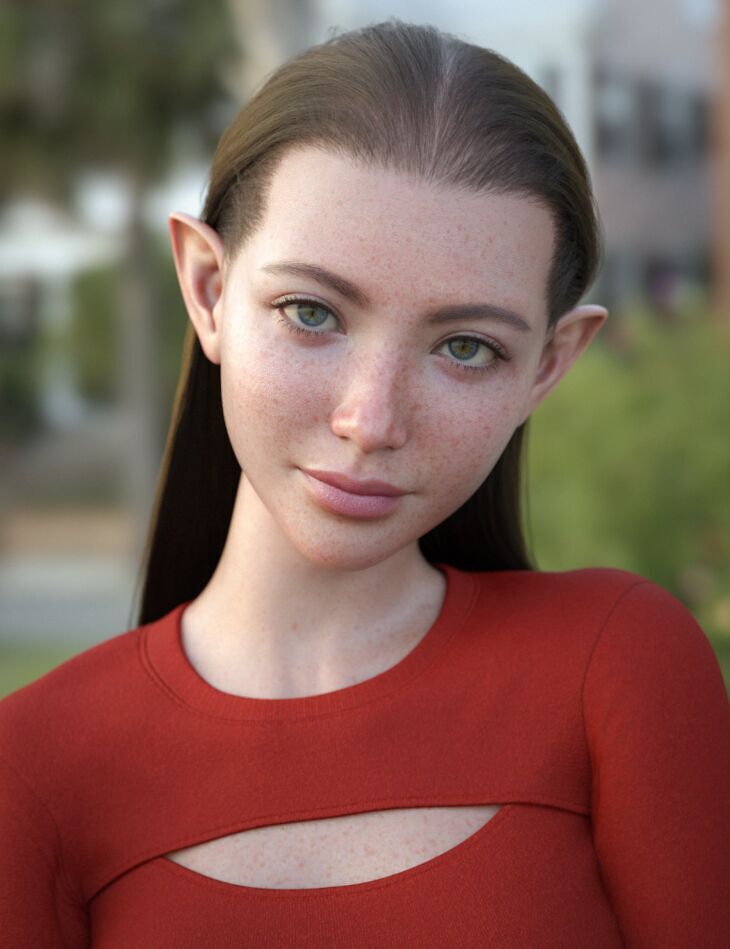
LI dForce Shower Tress Hair for Genesis 9 comes from Laticis Imagery via Daz 3D. The package ships 114 files, starting with LI dForce Shower Tress Hair for Genesis 9, Wearable Presets: LI STH WP – ! Offset Blonde, LI STH WP – ! Offset Example.
LI Shower Tress Hair Slick, soaked, and seriously flexible. This one’s a bit different… LI Shower Tress Hair is a dForce Strand-Based Hair for Genesis 9, designed primarily for that slicked-back, wet-hair look. But thanks to a combination of Pre-Simulation and Pre-Render Hair Generation settings, you can actually create a wide variety of looks, from freshly showered to windblown chaos. Fair warning, this one’s complex. There’s a lot going on under the hood to make it work, so I’ve included a generous range of wearable presets. These can serve as quick starting points or give you a deeper look into how everything functions. Since the hair relies heavily on Pre-Render Simulation to reduce sim time and save on system resources, I’ve added optional fitted offset meshes for the face, ears, and upper body. These help guide the hair more naturally and avoid awkward collisions, especially when things get sticky (literally). I’ve also included presets that freeze the hair and turn off Hair Generation settings, so you can tweak your pose afterward without the lag. A lot of the post-simulation parameters, mainly clumping and scraggle, cause the hair to contract and distort once the sim finishes. The strands will initially rest on the base meshes, but once the Pre-Render settings kick in, they often push through those surfaces. That’s why I’ve included those extra offset meshes for better collision control where it counts. You don’t have to use them, though you can just adjust the strand offset in the Surfaces tab. These just help give you more targeted control. For example, an offset value of 1 might look great on the body, but not on the scalp, depending on your pose. There’s a big batch of morphs included, some work best before sim, others after. And yeah, some might make a glorious mess depending on how “Target Surface” mode is feeling that day. Oh, and don’t panic when you see weird guide curves pop up during simulation. That’s just Target Surface doing its thing. They’ll disappear once the sim is complete. Density maps are your best friend with this kind of hair, so I’ve packed in a bunch. And to add even more posing flexibility, I’ve built the LI Shower Tress Hair Wind Rig, so you can dial in those dramatic, windblown shots without endless tweaking. Quick tip: try simulating from the current frame with “Start Bones from Memorized Pose” toggled on or off, depending on your setup. Sometimes animation works best. Sometimes it’s just the wind. Yes, it’s deep. Yes, it’s a little complicated. But if you dig into it, I think you’ll find it surprisingly powerful, and hopefully, you’ll find them super rewarding. I learned alot about dForce during this process. Happy rendering!
What’s included
- LI dForce Shower Tress Hair for Genesis 9
- Wearable Presets: LI STH WP – ! Offset Blonde
- LI STH WP – ! Offset Example
- LI STH WP – All Complex Dry
- LI STH WP – All Complex Silky
- LI STH WP – All Complex Slippery
- LI STH WP – All Complex Sticky
- LI STH WP – All Complex Wet
- LI STH WP – Bed Head All
- LI STH WP – Bed Head V1
- LI STH WP – Bed Head V2
- LI STH WP – Bed Head V3
- LI STH WP – Bed Head V4
- LI STH WP – Black Beauty PS (H)
- LI STH WP – Black Beauty PS (R)
- LI STH WP – Dual Head Split V1
- LI STH WP – Dual Head Split V2
- LI STH WP – Heavy Scraggle V1
- LI STH WP – Heavy Scraggle V2
- LI STH WP – Reduced Silk Black
- LI STH WP – Reduced Silk Blonde
- LI STH WP – The Long Bow V1
- LI STH WP – The Wildman V1
- LI STH WP – Wet Clumpy Hair
- LI Shower Tress Hair – Cap: Included morphs
- LI STH Cap – All Inflate
- LI STH Cap – All Relax
- LI STH Cap – All Shrinkwrap
- LI STH Cap – Move Back Head Out
- LI STH Cap – Move Back Neck Out
- LI STH Cap – Move Ears Out
- LI STH Cap – Move Forehead Out
- LI STH Cap – Move Side Burns Out
- LI STH Cap – Move Sides Out
- LI STH Cap – Move Temples Out
- LI STH Cap – Move Top Crown Out
- LI STH Cap – Move Top Head Out
- LI STH Cap – Slide Back Neck Expand
- LI STH Cap – Slide Back Neck Up
- LI STH Cap – Slide Contract
- LI STH Cap – Slide Ears Up
- LI STH Cap – Slide Expand
- LI STH Cap – Slide Fringe Back
- LI STH Cap – Slide Fringe Forwards
- LI STH Cap – Slide Receeding Forwards
- LI STH Cap – Slide Sideburns Down
- LI STH Cap – Slide Sideburns Forwards
- LI STH Cap – Slide Sideburns Spread
- LI STH Cap – Slide Sideburns Wider
- LI STH Cap – Slide Sides Back
- LI STH Cap – Slide Upper Temple Compress
- LI STH Cap – Slide Upper Temple Forwards
- LI STH Cap – Slide Widowspeak Back
- LI STH Cap – Slide Widowspeak Forwards
- LI Shower Tress Hair – Hair: Included morphs
- LI STH Head – Alpha Highly Refined Scalp
- LI STH Head – Back Bunched Up
- LI STH Head – Back Curled Upwards
- LI STH Head – Back Fan Out Backwards
- LI STH Head – Back Fan Out Bushy
- … and 54 more items in the archive.
Specifications
- Source: Daz 3D
- Compatible figures: Genesis 9
- Requires: Genesis 9 Starter Essentials
- File format: DUF
- Software / install: Daz Connect DIM Manual Install
- SKU: 110515
- Artist: Laticis Imagery
The file is mirrored on 8 hosting services; a free account is required to download.