LI dForce Pelt Poncho for Genesis 9 Plus
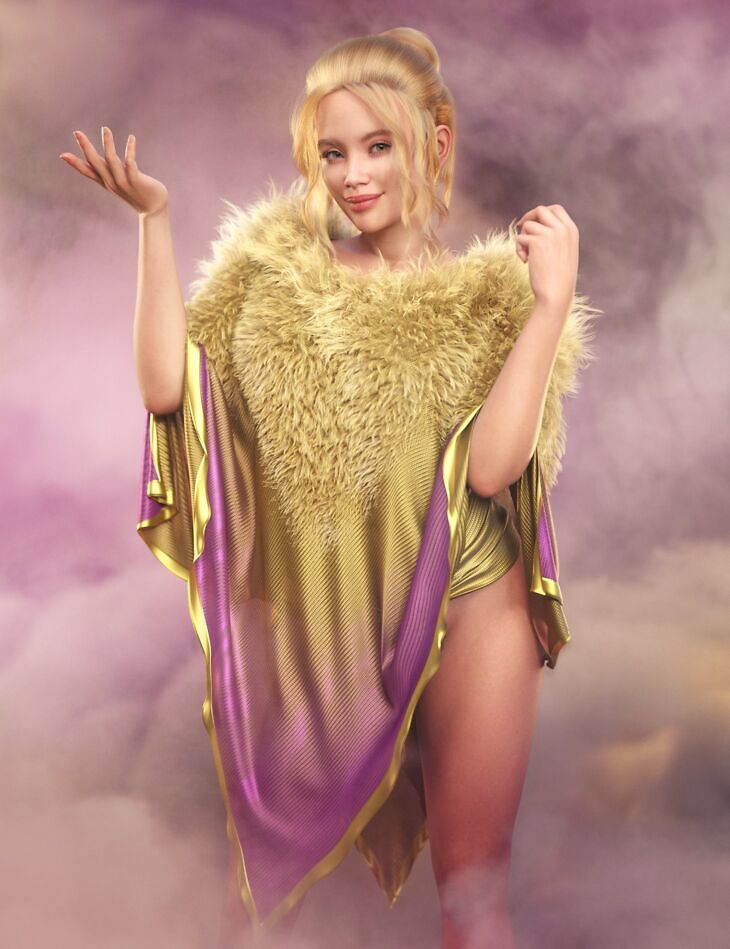
Published on Daz 3D, LI dForce Pelt Poncho for Genesis 9 Plus is Laticis Imagery’s clothing set. The download holds 134 items, among them LI dForce Pelt Poncho for Genesis 9 Plus, Clothing Pieces: LI dForce Pelt Poncho – Shawl, LI dForce Pelt Poncho – Shawl Handless.
Introducing LI dForce Pelt Poncho for Genesis 9! Add a new outerwear asset to your runtime with LI dForce Pelt Poncho, a truly versatile and customizable shawl for Genesis 9 and more. While it’s perfect for rugged, primitive, or ancient renders, this poncho goes far beyond that. With a large range of wearable presets and materials, you can effortlessly use it for elegant or even futuristic styles, offering endless creative potential for all kinds of scenes. Built and fitted on Genesis 9, the poncho also includes a Solo Asset version that offers reduced functionality and an adaptable fit on other characters, or it can serve as an additional overlay drape. Whether your scene calls for something wild and untamed or sleek and refined, this poncho has you covered – literally! (Shame about the hole in the middle it would make a great rug too! The LI dForce Pelt Poncho also comes loaded with a massive array of tileable textures, material, and shader presets. And these aren’t limited to the poncho alone! Mix and match these assets anywhere in your scenes to add more depth and visual interest. From fur-lined looks to seamless textures driven by grayscale maps, the customization possibilities are endless. Bonus Content: As a special extra, I’ve included a water droplet material for the Shawl Shell. This sparked a creative journey that resulted in an additional Shell asset for Genesis 9, where I’ve tried to take advantage of the materials to produce some cool layering effects for skin. Note: While the textures are seamless and tileable when used on Genesis 9 you will notice UV seams, but I’ve carefully crafted the presets to minimize this as much as possible. Key Features and Tips: Style Versatility: Easily switch between rugged, elegant, futuristic, or ancient looks with wearable presets and textures. The shawl’s design is extremely customizable for any aesthetic. Advanced Texture Control: Most materials are driven by seamless, grayscale texture maps with color control, which can be tiled for high customizability. Simulation Flexibility: Run simulations with or without fur—apply the fur after simulating or hide it in the scene panel for quicker setups. The fur is also dForce Hair letting you explore endless and alternative styling options and comes packed with a huge array of Strand-based presets. Faster Simulations: Hiding the fur will speed up simulation times, but applying it afterward adds detail and realism. Displacement Tips: When using shells and displacement maps, balance them carefully to avoid surface imperfections or interlacing issues. Morph Tips: The shawl also comes packed with a variety of morphs—some work better before simulating, others after—letting you create adjustments and varied looks. Whether you’re crafting a rugged wilderness explorer, an elegant traveler, or a futuristic warrior, the LI dForce Pelt Poncho is a versatile asset that adds richly textured and dynamic looks. It’s not just a poncho shawl thingymabob… Happy simulating and styling!
What’s included
- LI dForce Pelt Poncho for Genesis 9 Plus
- Clothing Pieces: LI dForce Pelt Poncho – Shawl
- LI dForce Pelt Poncho – Shawl Handless
- LI dForce Pelt Poncho – Shawl Shell
- LI dForce Pelt Poncho – Shawl (Morphs): LI dFPP Shawl – Add Contraction Heavy
- LI dFPP Shawl – Add Contraction Light
- LI dFPP Shawl – Add Drapping Backwards
- LI dFPP Shawl – Add Drapping Downwards
- LI dFPP Shawl – Add Drapping Forwards
- LI dFPP Shawl – Add Drapping Left
- LI dFPP Shawl – Add Drapping Right
- LI dFPP Shawl – Add Drapping Upwards
- LI dFPP Shawl – Add Flare Bottom
- LI dFPP Shawl – Add Inflated Base
- LI dFPP Shawl – Add Inflation
- LI dFPP Shawl – Add Scale to Cover
- LI dFPP Shawl – Add Surface Noise
- LI dFPP Shawl – Add V Neck Front
- LI dFPP Shawl – Move Bottom Back
- LI dFPP Shawl – Move Bottom Front
- LI dFPP Shawl – Move Out Back
- LI dFPP Shawl – Move Out Chest
- LI dFPP Shawl – Move Out Shoulders
- LI dFPP Shawl – Move Up Corners All
- LI dFPP Shawl – Move Up Corners Back
- LI dFPP Shawl – Move Up Corners Front
- LI dFPP Shawl – Move Up Corners Left
- LI dFPP Shawl – Move Up Corners Right
- LI dFPP Shawl – Neckline Border Expanded
- LI dFPP Shawl – Neckline Border Smoother
- LI dFPP Shawl – Neckline Closed Roughly
- LI dFPP Shawl – Neckline Open
- LI dFPP Shawl – Neckline Roughness
- LI dFPP Shawl – Reduce Area
- LI dFPP Shawl – Reduce Arm Length
- LI dFPP Shawl – Reduce Border All
- LI dFPP Shawl – Reduce Border Inner
- LI dFPP Shawl – Reduce Border Outer
- LI dFPP Shawl – Reduce Corner Sides
- LI dFPP Shawl – Reduce Neck Back
- LI dFPP Shawl – Reduce Neckline
- LI dFPP Shawl – Reset to Flat
- LI dFPP Shawl – Ruffle Border Inner Heavy
- LI dFPP Shawl – Ruffle Border Outer Heavy
- LI dFPP Shawl – Ruffle Border
- LI dFPP Shawl – Ruffle Borders V2
- LI dFPP Shawl – Ruffle Borders V3
- LI dFPP Shawl – Ruffle Bottom
- LI dFPP Shawl – Ruffle Shawl
- LI dFPP Shawl – Slide Up Arm Both
- LI dFPP Shawl – Slide Up Arm Left
- LI dFPP Shawl – Slide Up Arm Right
- LI dFPP Shawl – Slide Up Forearm Both
- LI dFPP Shawl – Slide Up Forearm Left
- LI dFPP Shawl – Slide Up Forearm Right
- LI dFPP Shawl – Smoother Relaxed
- LI dFPP Shawl – Smoother Shawl
- LI dFPP Shawl – Smoother Shoulders
- Supported Shapes: Ally 9
- Angela 9
- … and 74 more items in the archive.
Specifications
- Source: Daz 3D
- Compatible figures: Genesis 9
- File format: DUF
- Software / install: Daz Connect DIM Manual Install
- SKU: 104660
- Artist: Laticis Imagery
It is available through 9 mirrors. Registration is free and takes a moment.