Nidaly Scene Load Optimizer and Dynamic Morph Injection (W64)
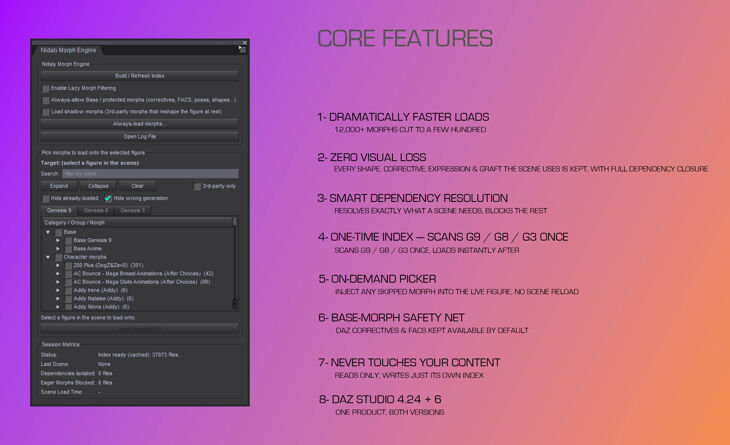
Nidaly released Nidaly Scene Load Optimizer and Dynamic Morph Injection (W64) on RenderHub. The package is distributed through the download mirrors below.
Load only the morphs your scene actually uses — and load your figures and scenes dramatically faster.
——————————————————————————————————————————————–
NIDALY MORPH ENGINE — VERSION 1.2.0
Two new load options, plus faster morph sets.
Install over 1.1.0 — your index, settings, always-load list, saved sets and favorites all carry over, and no rebuild is needed.
▸ NEW LOAD OPTIONS
Both are off by default, so loading behaves exactly as before until you tick them.
• Load the whole product folder of every used morph — When a scene dials a character morph, the rest of that character’s morphs come in too — its expressions, correctives and other dials — ready to use after the load. Only morphs actually dialled in the scene count, and DAZ’s own Base and FACS folders are never expanded. This costs load time (typically a few hundred extra morphs for a dressed character); the log says how many each load added.
• Load morphs saved in the scene at 0 — A scene can list morphs whose slider is at zero. They are skipped by default because they change nothing; tick this to load them anyway.
▸ MORPH SETS
• Sort your sets — Right-click a set to move it up, down, to the top or to the bottom, or sort the whole list A-Z. Works in the pane and in the always-load window.
• Faster with many or very large sets — The pane and the always-load window open faster, and a set’s “missing” count and contents list are worked out when you hover it. Reading the sets file is about twice as fast.
▸ UNCHANGED
Filtering, dependency resolution, the on-demand picker, the always-load whitelist and the Batch Render script interface behave exactly as in 1.1.0.
WHAT’S NEW IN 1.1.0
Install over 1.0.2. Your index, settings, always-load list, saved sets and
favorites all carry over, and no rebuild is needed.
FASTER
– The pane opens about three times faster. Only the generation tab you are
looking at is built; the others fill the first time you open them.
– Loading morphs onto a figure is quicker, and no longer gets slower as your
library grows. The plugin used to search your entire index once for every
graft on the figure, so a dressed character with eyes, mouth and anatomy paid
that cost three or four times over on every load. It is now a single pass.
– The always-load window opens immediately, however many morphs you own. Each
generation’s list is built when you expand it.
– Browsing content is smoother. Between scene loads the filter now steps aside
completely, instead of inspecting every file DAZ reads for the Content
Library, Smart Content and thumbnails.
– Building the index shows progress and can be cancelled, and starts reading
sooner because it no longer walks your library twice.
MORPH SETS, NOW IN THE PANE
Groups are now called morph sets. Only the wording changed: your existing
groups carry over untouched, and .nmg files you have already shared still
import.
– Your saved sets are a list in the picker itself, not a menu and not a window.
Double-click a set to load it onto the selected figure, or ctrl-click several
to load them together. A morph in two of them is loaded once.
– Four small buttons beside the list: inject, tick in the tree, save what is
ticked as a new set, and delete. Right-click for rename, duplicate and
replace-with-ticked.
– Build a set from what you ticked. Tick morphs anywhere in the tree, across
every generation tab, press save, name it, and it is ready to load from then
on.
– Each row shows its morph count, marks anything you do not have installed, and
hovering it lists what is actually inside.
– Sets are shared with the always-load window, so one built there works here.
FAVORITES
– A heart on every morph row. Click to favorite, click again to remove: no
ticking first, no buttons. A faint heart follows the row under your mouse, so
you can mark morphs as you browse.
– Category and product rows have one too, covering everything underneath in a
single click. It
Specifications
- Source: RenderHub
- File format: Daz Studio DUF
- Software / install: Daz Studio
- SKU: 372575
- Artist: Nidaly
Download links for 3 mirrors are listed below.