Smart Content Finder for Daz3D v1.5
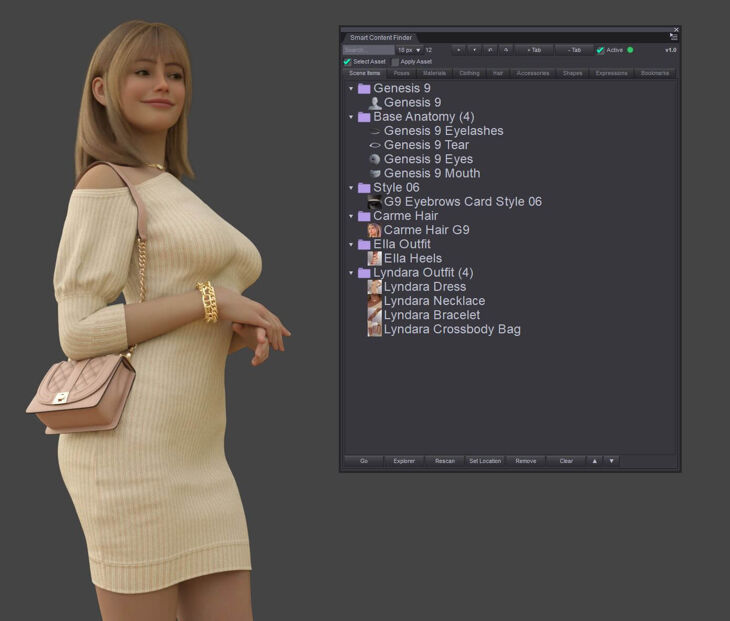
From Heiwa Interactive Arts comes Smart Content Finder for Daz3D v1.5, a tool for Original Daz Figure, available on RenderHub. The full archive is available from the mirrors listed below.
SMART CONTENT FINDER FOR DAZ STUDIO V1.6
Works with Daz Studio 4 and 6
SMART CONTENT FINDER is at the moment Windows-only (Windows 10/11, DAZ Studio 4.5–4.x 64-bit and 32-bit, and DAZ Studio 6.25 and 6.26)
AI was used
STOP SEARCHING. START CREATING.
Ever loaded a character, outfit, pose, material, hair, or accessory and later wondered “where did that file come from?”
Smart Content Finder instantly locates content already in your scene and jumps you back to the right Content Library folder, with about 99% accuracy. No more digging through endless folders for assets you’ve already used.
WHAT IT DOES
• Tracks the content in your scene, live
• Organizes it into easy‑to‑browse tabs
• Finds original locations including custom, mapped & multiple libraries
• Jumps you straight to the Content Library folder
• Search & filter instantly
• Favorites, bookmarks and custom tabs
• Remembers locations for faster future searches
SUPPORTED CONTENT
Figures • Clothing • Hair • Materials • Poses • Expressions • Shapes • Accessories • Bookmarks
PLUGIN + SCRIPT INCLUDED
• Full DLL plugin (recommended) a dockable pane that updates live as you work
• Script version
V1.6 UPDATE
• Right‑click any row: Favorite with colored stars, Rename, Add to Bookmark (also from Scene Items)
• Favorites stay: starred folders are never removed by the automatic tab limit
• Export / Import Cache: your locations, tabs, bookmarks and favorites in one file, for a backup or another PC.
• New Settings window (gear button), the off‑screen re‑center can now be turned off
• Hair & accessories load onto the selected figure, materials onto the right item or figure
• Hiding an item in Daz’s Scene pane now updates the Scene Items tab
• No long freezes while loading, every search is time‑limited
• DAZ Studio 6.26 support and a new 32‑bit build for DAZ Studio 4
• Many bug fixes
• AI was used in this update
EARLIER UPDATES
• V1.5 Performance fixes, off‑screen panel auto‑recovery, tidier tabs with pinned manual folders
• V1.4 Better locating for Genesis 1 & 2, clothing & full outfit sets
• V1.3 Custom & mapped libraries, resizable panel, more reliable DS6 tracking
• V1.2 Daz Studio 6 support
• V1.1 Hide/unhide, quick delete, performance
IMPORTANT NOTES
• Never moves, modifies, or deletes your content files
• Manual location tools included for unusual folder layouts
• ~99% accurate, not perfect a few unusually‑packaged items may need a quick manual pick
• Cache is located here:
Daz Studio 4: Computer\HKEY_CURRENT_USER\SOFTWARE\DAZ\Studio4\LocateItemPanel
Daz Studio 6: Computer\HKEY_CURRENT_USER\SOFTWARE\DAZ\Studio6\LocateItemPanel
• Back it up or move it to another PC: gear button > Export Cache / Import Cache
• You can also clear it from the plugin:
1. Go to the Scene tab.
2. Click Clear.
3. Then click (Warning) Clear Cache + Items.
Spend less time searching. Spend more time creating
Specifications
- Source: RenderHub
- Compatible figures: Original Daz Figure
- File format: Daz Studio DUF
- Software / install: Daz Studio
- SKU: 354218
- Artist: Heiwa Interactive Arts
It is available through 7 mirrors. Registration is free and takes a moment.