SculptTool for Daz3D
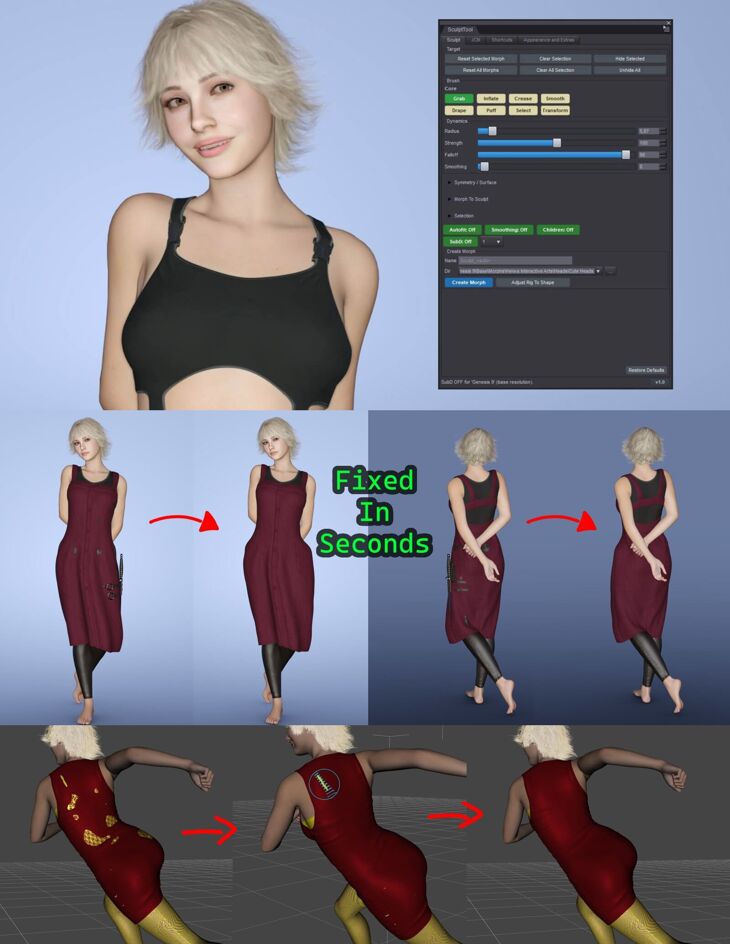
SculptTool for Daz3D is a tool that Heiwa Interactive Arts built for Original Daz Figure; it is distributed through RenderHub. The package is distributed through the download mirrors below.
SculptTool For Daz3D – V1.4
AI Was Used for Newest Update
SculptTool is at the moment Windows-only (Windows 10/11, DAZ Studio 4.5–4.x, and DAZ Studio 6)
SculptTool – Fix Cloth clipping, Smooth Areas & Create Morphs/JCMs Without Leaving DAZ Studio
NO MORE EXPORTING TO BLENDER OR ZBRUSH FOR A FIVE-SECOND FIX.
You know the workflow: clothing clips through a pose, a joint creases oddly, or
a morph just needs a little nudge – and normally that means exporting to
Blender or ZBrush, fixing it there, and importing everything back into DAZ
Studio. Sculpt Tool skips all of that. It adds real brush tools directly to
the DAZ Studio viewport, so you can push, smooth, and correct the mesh right
where it is – then turn that fix into a proper DAZ morph or JCM without ever
leaving the program.
NEW IN V1.4
• Circle Follows Surface: the brush circle tilts to lie on the surface under
the cursor – on a cheek or the side of the head you see exactly the area the
brush covers (on by default, can be switched off).
• One-vertex Grab and Select: make the brush small enough and Grab moves – or
Select picks – exactly one vertex, without pulling its neighbours along.
• Keep Clothes Smooth While Sculpting: with Mesh Smoothing on, fitted clothes
keep their smoothed look while you drag and smooth again when you let go
(optional, off by default).
• DAZ Studio 6.26 support: one Daz 6 file that loads in DAZ Studio 6.25 and in
6.26 or newer – plus a new 32-bit build for 32-bit DAZ Studio 4.
• DAZ Studio 4: brush and selection picks now stay under the brush circle
across the whole viewport, also with the render aspect frame shown.
• Shortcuts act in the viewport under the cursor, and on DAZ Studio 4 they
work without clicking the viewport first.
• The Transform gizmo settings now sit in the Selection section, and many
fixes: a hidden selected item no longer lets the brush hit other meshes,
Mirror no longer leaves spikes, and a possible Box / Lasso crash is fixed.
V1.3
• Faster and smoother almost everywhere – with or without clothing: strokes
follow the cursor more closely, no stepping or hitches, much less Grab lag
on heavy figures, smoother on dense meshes and hair, and much faster Undo
of big sculpts on DAZ Studio 6.
• Even faster with clothing: Mesh Smoothing switches off by itself while you
sculpt and comes back when you leave the tool, plus a “Drag: Fast” mode
for a lighter preview while dragging.
• A tip for almost everything: the status line explains every click, every
brush and every save – including why a stroke didn’t start.
• Your morphs are protected: re-using a name never silently overwrites an
earlier morph – a popup asks first.
• Grow / Shrink Selection (Ctrl + Plus / Ctrl + Minus), Alt + Shift +
middle-drag for brush Smoothing, and many fixes.
V1.2
• Falloff Shapes: pick the brush’s falloff curve – Smooth, Sphere, Root, Inverse Square, Sharp, Linear, Constant or Random – for finer control over how a stroke ramps from the center out to the edge.
• Brush Offset: a small pad that pushes the brush’s falloff peak off-center, so a stroke pulls harder to one side – perfect for bending a fold, a strap or a limb. Works with Grab and Pose Grab (and the Transform rotate pivot), and mirrors correctly when symmetry is on.
• Exit to Universal Tool: a one-click button to hand the viewport straight back to DAZ’s Universal Tool (move / rotate / scale), right at the top of the pane.
• Much faster in DAZ Studio 6: sculpting with “Include Children” turned on (over conformed clothing, eyes, lashes and so on) is dramatically faster – what used to stutter now tracks smoothly.
• Smooth brush fix: it now also relaxes the inner / back side of thin clothing.
WHAT IT’S ACTUALLY GREAT FOR
• Fixing clipping and poke-through: a sleeve poking through an arm, a collar clipping the neck, a shoe clipping the floor – grab it and push it back into place in seconds.
• Smoothing rough areas: relax a harsh seam, soften a wrinkle, clean up a pinch after posing – the Smooth brush blends i
Specifications
- Source: RenderHub
- Compatible figures: Original Daz Figure
- File format: Daz Studio DUF
- Software / install: Daz Studio
- SKU: 369568
- Artist: Heiwa Interactive Arts
Download links for 3 mirrors are listed below.