FPE HD Face Wounds Severe for Genesis 9
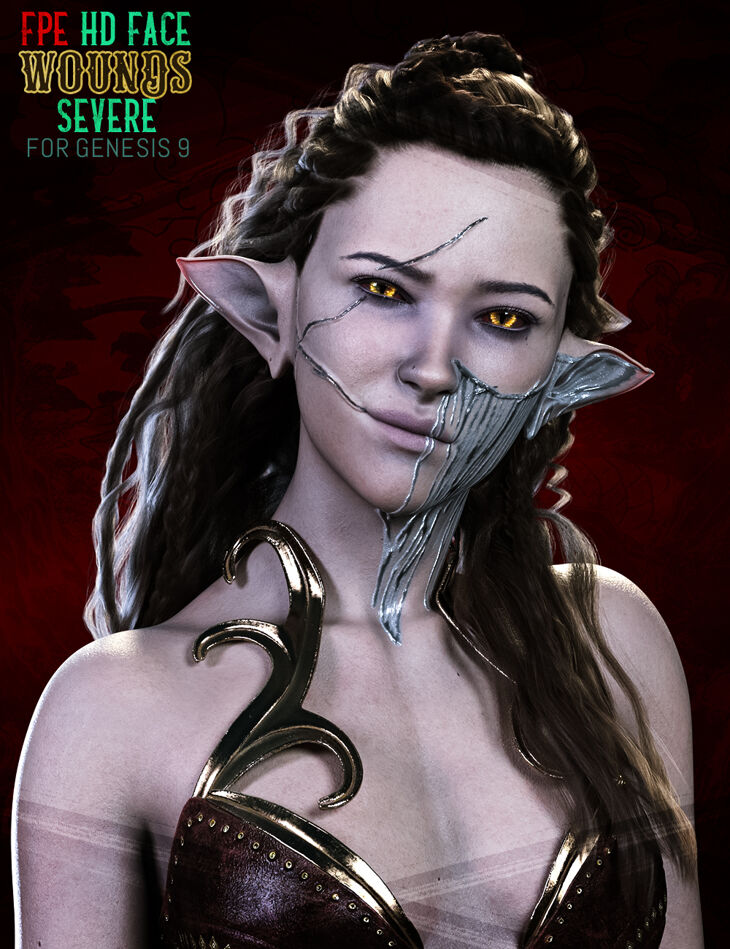
From Esid FenixPhoenix comes FPE HD Face Wounds Severe for Genesis 9, a lighting and shader set, available on Daz 3D. The download holds 82 items, among them FPE HD Face Wounds Severe for Genesis 9, HD Morphs: FPE Wounds2 CheekH L/R, FPE Wounds2 CheekV L/R.
“FPE HD Face Wounds Severe” for Genesis 9 is a pack of 10 different wounds (plus their mirror version) that ties thematically to our “FPE HD Face Wounds for Genesis 9”, helping depict the painful event that marked your character’s past. The wound pack has three components to it: 10 HD Morphs | The wounds can be applied via the dials available in the parameters and shaping tabs (which include cards for easy identification) or the handy shaping presets, including a preset to zero all the Wound morphs in this pack. Since the morphs are HD, the character must be set to a render SubDivision of 3 or 4 for them to show. Scripts to change the SubD Render Level are included! The textures are applied via two Geoshells, one which controls the wound and the other which controls the blood trail. Not only do we ensure the final look of the application is maintained regardless of whether your character uses Iray Uber or PBRShader skin, but we also create a non-destructive way of applying the textures. The versatility of Geoshell allows you to quickly and efficiently build, change, tweak, and/or delete wounds and blood without affecting or altering your character’s underlying skin. A Wound Geoshell and 24 LIE Presets | As with some of our recent products, a general wound texture is pre-applied to the Geoshell. This means the wound shows up through masks applied via LIE in only the cutout channel, making the process fast and painless. A Wound Blood Geoshell and 24 LIE Presets | The Blood trail has some textures pre-applied to the shell. However, to allow stacking, each LIE must apply four additional LIE textures onto different channels, making this application somewhat slower than the wound one. 15 Utility Presets are included to assist you in refining the Geoshells. The textures should blend with all skin colors, but feel free to experiment by changing the base and translucency colors. Of course, we included instructions via several scripts detailing the application process, troubleshooting, and some tips on how to use these extra presets. The Wounds will only appear once you’ve applied one of the Layered Image Editor (LIE) Presets onto the Geoshells. A partial material preset and a script to clear the LIEs are also available. CREATING AN ECOSYSTEM While the following video is explained with our first pack of wounds, the information relayed applies to this pack and the one that will follow. Like our Scar Ecosystem packs for G9, we are building a Wound Ecosystem for Genesis 9. Wherein you can easily mix and match the wounds between packs seamlessly. As such, subsequent packs will include the same Geoshells and some of the texture maps as this first pack to help you save on resources. This also means that all presets included in this pack can be used in future packs and vice versa. Combine Wounds and Stack Geoshells to give your Genesis 9 Characters a unique look. We also hope this pack will be a powerful storytelling tool for you. Perhaps your character had a close call on the battlefield? Or maybe she or he managed to come out of an eerie accident? Maybe she or he was held hostage by the enemy or came out of a friendly fight with a memento. Whatever scenario you envisioned; we hope this pack will help you tell your story!
What’s included
- FPE HD Face Wounds Severe for Genesis 9
- HD Morphs: FPE Wounds2 CheekH L/R
- FPE Wounds2 CheekV L/R
- FPE Wounds2 EyeH L/R
- FPE Wounds2 EyeV L/R
- FPE Wounds2 FaceH L/R
- FPE Wounds2 ForeheadH L/R
- FPE Wounds2 JawH L/R
- FPE Wounds2 MouthH L/R
- FPE Wounds2 MouthV L/R
- FPE Wounds2 NoseH L/R
- Shaping Presets: FPE Face Wounds2 00 Shape CheekH L/R
- FPE Face Wounds2 00 Shape CheekV L/R
- FPE Face Wounds2 00 Shape EyeH L/R
- FPE Face Wounds2 00 Shape EyeV L/R
- FPE Face Wounds2 00 Shape FaceH L/R
- FPE Face Wounds2 00 Shape ForeheadH L/R
- FPE Face Wounds2 00 Shape JawH L/R
- FPE Face Wounds2 00 Shape MouthH L/R
- FPE Face Wounds2 00 Shape MouthV L/R
- FPE Face Wounds2 00 Shape NoseH L/R
- FPE Face Wounds2 00 Shape Zero All
- Wearables: FPE Face Wounds2 01 Apply Geoshell Blood
- FPE Face Wounds2 01 Apply Geoshell Wound
- Layered Image Editor (LIE) Presets: FPE Face Wounds2 03 LIE CheekH Left/Right
- FPE Face Wounds2 03 LIE CheekV Left/Right
- FPE Face Wounds2 03 LIE EyeH Left/Right
- FPE Face Wounds2 03 LIE EyeV Left/Right
- FPE Face Wounds2 03 LIE FaceH Left/Right
- FPE Face Wounds2 03 LIE ForeheadH Left/Right
- FPE Face Wounds2 03 LIE JawH Left/Right
- FPE Face Wounds2 03 LIE MouthH Left/Right
- FPE Face Wounds2 03 LIE MouthV Left/Right
- FPE Face Wounds2 03 LIE NoseH Left/Right
- FPE Face Wounds2 Blood 04 LIE CheekH Left/Right
- FPE Face Wounds2 Blood 04 LIE CheekV Left/Right
- FPE Face Wounds2 Blood 04 LIE EyeH Left/Right
- FPE Face Wounds2 Blood 04 LIE EyeV Left/Right
- FPE Face Wounds2 Blood 04 LIE FaceH Left/Right
- FPE Face Wounds2 Blood 04 LIE ForeheadH Left/Right
- FPE Face Wounds2 Blood 04 LIE JawH Left/Right
- FPE Face Wounds2 Blood 04 LIE MouthH Left/Right
- FPE Face Wounds2 Blood 04 LIE MouthV Left/Right
- FPE Face Wounds2 Blood 04 LIE NoseH Left/Right
- Material Presets: FPE Face Wounds2 02 MAT Black
- FPE Face Wounds2 02 MAT Blue
- FPE Face Wounds2 02 MAT Bronze
- FPE Face Wounds2 02 MAT Dark Blue
- FPE Face Wounds2 02 MAT Dark Green
- FPE Face Wounds2 02 MAT Dark Red
- FPE Face Wounds2 02 MAT Dark Silver
- FPE Face Wounds2 02 MAT Gold
- FPE Face Wounds2 02 MAT Green
- FPE Face Wounds2 02 MAT Purple
- FPE Face Wounds2 02 MAT Red
- FPE Face Wounds2 02 MAT Silver
- FPE Face Wounds2 02 MAT Yellow
- FPE Face Wounds2 02.2 Gloss OFF
- FPE Face Wounds2 02.2 Gloss ON
- FPE Face Wounds2 02.3 Metallic Fantasy OFF
- … and 22 more items in the archive.
Specifications
- Source: Daz 3D
- Compatible figures: Genesis 9
- Requires: Genesis 9 Starter Essentials
- File format: DUF
- Software / install: Daz Connect DIM Manual Install
- SKU: 102133
- Artist: Esid FenixPhoenix
It is available through 7 mirrors. Registration is free and takes a moment.