Soft Skin Transitions for Genesis 8 and 8.1 Males
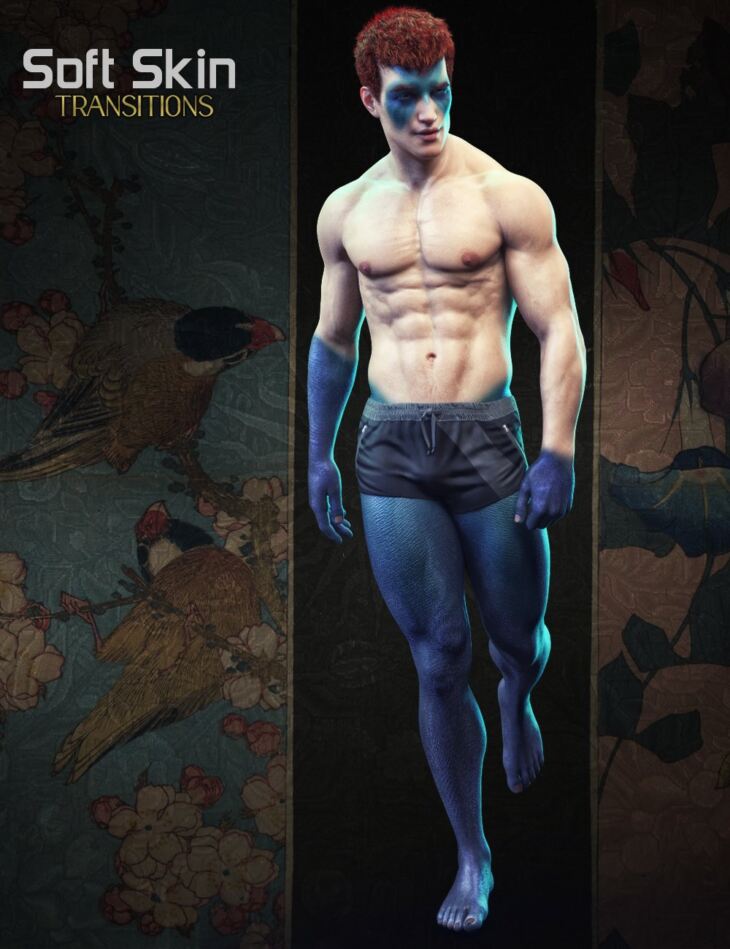
Published on Daz 3D, Soft Skin Transitions for Genesis 8 and 8.1 Males is Esid FenixPhoenix’s lighting and shader set for Genesis 8 Male, Genesis 8.1 Male. The download holds 97 items, among them Soft Skin Transition for Genesis 8 & 8.1 Males: SSTM 01 Apply Trans Shell to 8.1M with 8.1M UVs, SSTM 01 Apply Trans Shell to 8.1M with 8M UVs, SSTM 01 Apply Trans Shell to 8M.
Soft Skin Transitions for Genesis 8 and 8.1 Males is a set of opacity masks applied to a geoshell that will allow you to quickly and easily create transitions between 2 skins applied to a single character from within the comfort of Daz Studio. This pack was intended as a companion product for our Alternate Textures for Oso Newt and Genesis 8.1 Males pack, but it’s designed to allow you to combine almost any skin* in your arsenal to create a brand new look. This is perfect to show a character that may have been experimented on. Or perhaps he’s the product of 2 races coming together and producing an entirely new way of life. It’s up to you what type of meaning you’ll give the resulting skin! This utility pack consists of 3 Wearable Presets, 55 LIE Mask Presets, and 18 Visibility Presets. The product should work with both Genesis 8 and 8.1 Males. And since Genesis 3 uses the same UVs as Genesis 8, the presets should be compatible to work with the previous generation so long as the skin applied to the transitional geoshell wearable uses the base male UVs. While this was created to blend 2 skins together via different transitions, you could push the product further by blending in other types of materials. To that end, we included 5 bonus metallic material presets to blend into the underlying skin. Of course, keep in mind that when using shaders, there are limitations, which are explained in detail in the included PDF readme. In short, you’ll need to set the tiling to 1 and use the Base Male UVs for the masks to look as intended. This will most certainly result in seams across the surfaces if the materials in question were not made specifically for the Base UVs. In the case of our bonus materials, they should yield no seams. *Important: Only skins using Daz Iray Uber Base Shader can be applied to the geoshell as the cutout opacity channel is required to build the blending transitions. That said, your character CAN use the latest PBR skin shader (as the underlying skin). It’s just the geoshell that’s not compatible with the PBR skin shader. A PDF readme guide has been included to guide you through the process of using this product from its installation to its limitations and workarounds. *Neither this or its female equivalent product is a merchant resource.
What’s included
- Soft Skin Transition for Genesis 8 & 8.1 Males: SSTM 01 Apply Trans Shell to 8.1M with 8.1M UVs
- SSTM 01 Apply Trans Shell to 8.1M with 8M UVs
- SSTM 01 Apply Trans Shell to 8M
- Iray Material Presets SSTM 01.2 Transition Material 8.1 Bronze
- SSTM 01.2 Transition Material 8.1 Gold
- SSTM 01.2 Transition Material 8.1 Metallic Aqua
- SSTM 01.2 Transition Material 8.1 Metallic Black
- SSTM 01.2 Transition Material 8.1 Silver
- SSTM 01.2 Transition Material Bronze
- SSTM 01.2 Transition Material Gold
- SSTM 01.2 Transition Material Metallic Aqua
- SSTM 01.2 Transition Material Metallic Black
- SSTM 01.2 Transition Material Silver
- SSTM 01.3 Prepare Trans for 8.1M
- SSTM 01.3 Prepare Trans for 8M
- (LIE) Layered Image Editor Prestes SSTM 02 Apply Mask Abs Left
- SSTM 02 Apply Mask Abs Right
- SSTM 02 Apply Mask Back 8.1
- SSTM 02 Apply Mask Back
- SSTM 02 Apply Mask Chest
- SSTM 02 Apply Mask Crown
- SSTM 02 Apply Mask Eye Left
- SSTM 02 Apply Mask Eye Right
- SSTM 02 Apply Mask Forearm Left
- SSTM 02 Apply Mask Forearm Right
- SSTM 02 Apply Mask Forehead 8.1
- SSTM 02 Apply Mask Forehead 8
- SSTM 02 Apply Mask Full Arm Left
- SSTM 02 Apply Mask Full Arm Right
- SSTM 02 Apply Mask Full Leg Left
- SSTM 02 Apply Mask Full Leg Right
- SSTM 02 Apply Mask Half Body Left 8.1
- SSTM 02 Apply Mask Half Body Left
- SSTM 02 Apply Mask Half Body Right 8.1
- SSTM 02 Apply Mask Half Body Right
- SSTM 02 Apply Mask Hand Left
- SSTM 02 Apply Mask Hand Right
- SSTM 02 Apply Mask Head
- SSTM 02 Apply Mask Head 8.1
- SSTM 02 Apply Mask Hip Left
- SSTM 02 Apply Mask Hip Right
- SSTM 02 Apply Mask Lower Body
- SSTM 02 Apply Mask Lower Face 8.1
- SSTM 02 Apply Mask Lower Face
- SSTM 02 Apply Mask Lower Leg Left
- SSTM 02 Apply Mask Lower Leg Right
- SSTM 02 Apply Mask Neck 8.1
- SSTM 02 Apply Mask Neck
- SSTM 02 Apply Mask Outer Arm Left
- SSTM 02 Apply Mask Outer Arm Right
- SSTM 02 Apply Mask Outer Thigh Left
- SSTM 02 Apply Mask Outer Thigh Right
- SSTM 02 Apply Mask Pec Left
- SSTM 02 Apply Mask Pec Right
- SSTM 02 Apply Mask Ribs Left
- SSTM 02 Apply Mask Ribs Right
- SSTM 02 Apply Mask Shin Left
- SSTM 02 Apply Mask Shin Right
- SSTM 02 Apply Mask Shoulder Left
- SSTM 02 Apply Mask Shoulder Right
- … and 37 more items in the archive.
Specifications
- Source: Daz 3D
- Compatible figures: Genesis 8 Male, Genesis 8.1 Male
- File format: DUF
- Software / install: Daz Connect DIM Manual Install
- SKU: 84996
- Artist: Esid FenixPhoenix
The file is mirrored on 9 hosting services; a free account is required to download.