ALO Marilena Hair for Genesis 9, 8 and 8.1 Female
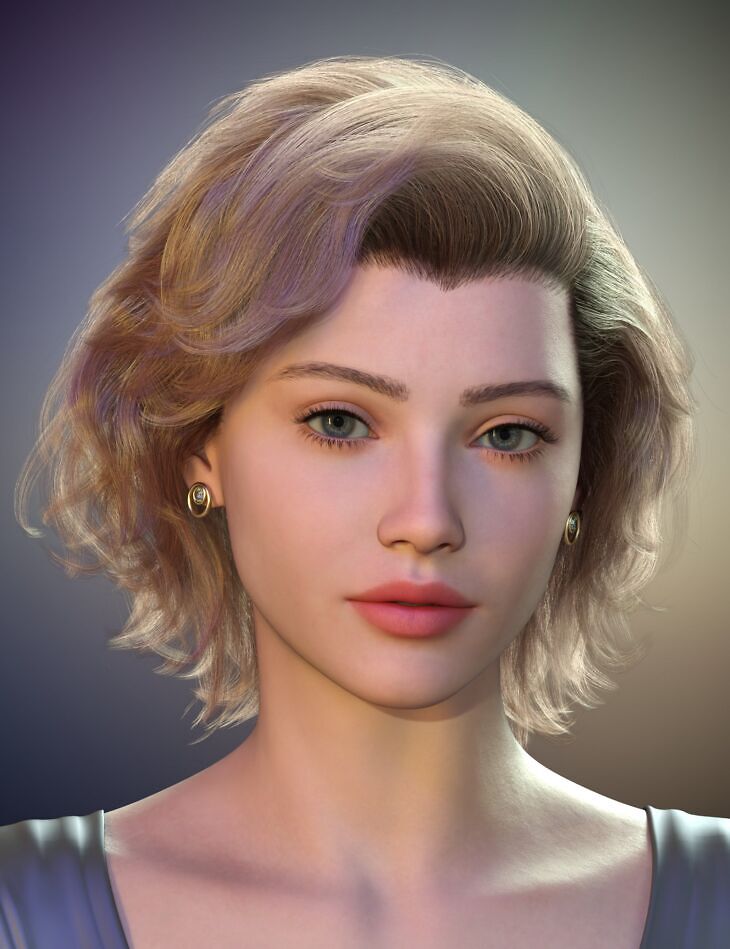
ALO Marilena Hair for Genesis 9, 8 and 8.1 Female is a hair asset for Genesis 8 Female, Genesis 8.1 Female, Genesis 9, created by Akhelloos and published on Daz 3D. It contains 101 files; the list begins with Marilena Hair for Genesis 9, 8 and 8.1 Females, Marilena Earrings for Genesis 9, 8 and 8.1 Females, Hair Morphs: Adjust Clothes Distance.
Marilena Hair, a timeless short hairstyle that combines the sleek, straight lines at the crown with soft, flowing waves at the neck. A delicate fringe adds a touch of sophistication, while the subtle volume at the roots gives a confident, glamorous look. The included earrings are designed with a vintage vibe, as to compliment the hairstyle. The hair is fully conforming and is rigged with 4 extra bones, that can be used for small modifications to the posing, if needed. It includes 23 adjustment, 10 movement, 37 styling and 16 windy morphs, as well as 14 style shaping presets, 92 Iray hair material presets and 21 totally blond materials with light roots, as well as partial streak presets and an alternative opacity option for fine hair. Additionally, a blank (off-white) Iray material preset allows for custom coloring by adjusting the base, translucency, glossy and topcoat colors. 10 examples of custom color variations are included to help you experiment. (It’s not a merchant resource, the blank material is only usable on this hairstyle’s UV mapping). The earrings include 10 material presets and a pose to hide the hanging embellishment, for a simple look. Step into the spotlight with our modern, yet vintage-inspired hairstyle, that’s sure to make your character look like a star!
What’s included
- Marilena Hair for Genesis 9, 8 and 8.1 Females
- Marilena Earrings for Genesis 9, 8 and 8.1 Females
- Hair Morphs: Adjust Clothes Distance
- Adjust Ears Front L
- Adjust Ears Front R
- Adjust Ears Side L
- Adjust Ears Side R
- Adjust Ears Up L
- Adjust Ears Up R
- Adjust Forehead Extrude
- Adjust Forehead Lower In
- Adjust Forehead Lower Rotate
- Adjust Forehead Wide
- Adjust Head Size
- Adjust Neck Back
- Adjust Neck Up
- Adjust Neck Wide L
- Adjust Neck Wide R
- Adjust Side L
- Adjust Side R
- Adjust Temples Front L
- Adjust Temples Front R
- Adjust Temples Wide L
- Adjust Temples Wide R
- Adjust Top Height
- Back Swing L
- Back Swing R
- Bangs Style A
- Bangs Style B
- Bangs Style C
- Bangs Tip Deflate
- Bangs Top Deflate
- Curls Messy Bangs
- Curls Messy Middle
- Curls Messy Side L
- Curls Messy Side R
- Curls More Messy Bangs
- Curls More Messy Middle
- Curls More Messy Side L
- Curls More Messy Side R
- Forehead Line Thick
- Forehead Peak
- Forehead Wisps L
- Forehead Wisps R
- Move Back
- Move Bangs Back
- Move Bangs Front
- Move Bangs Right
- Move Side Back L
- Move Side Back R
- Move Side Out L
- Move Side Out R
- Roll Tips Bangs
- Roll Tips Middle
- Roll Tips Side L
- Roll Tips Side R
- Smooth Curves Bangs
- Smooth Curves Middle
- Smooth Curves Side L
- Smooth Curves Side R
- … and 41 more items in the archive.
Specifications
- Source: Daz 3D
- Compatible figures: Genesis 8 Female, Genesis 8.1 Female, Genesis 9
- File format: DUF
- Software / install: Daz Connect DIM Manual Install
- SKU: 104903
- Artist: Akhelloos
It is available through 9 mirrors. Registration is free and takes a moment.