ALO Phoenicia Hair and Accessories for Genesis 9, 8 and 8.1 Female
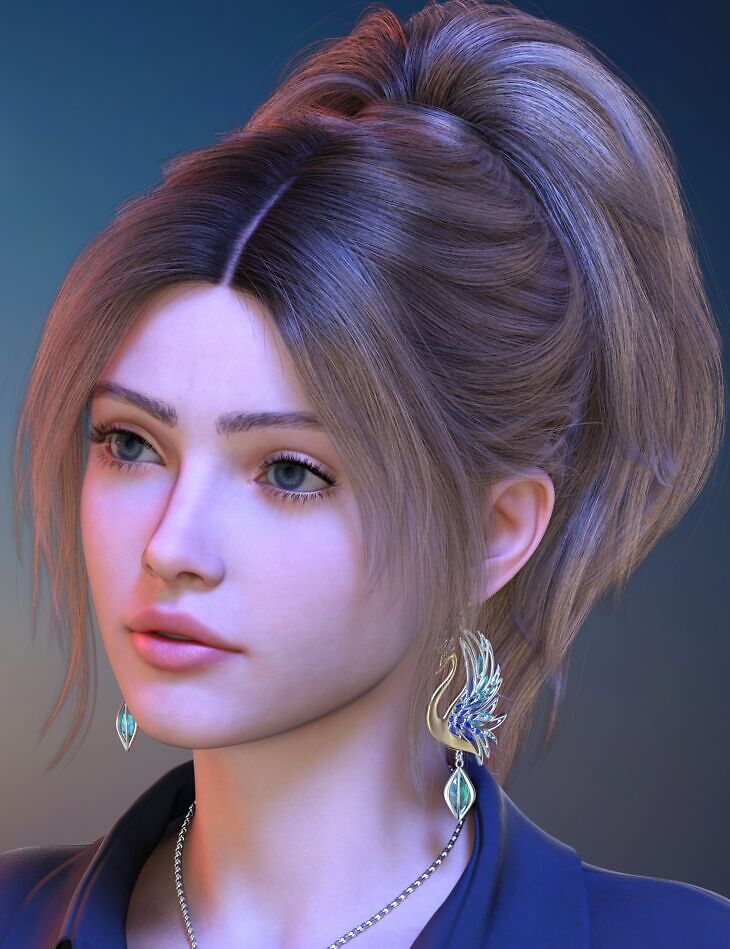
Akhelloos released ALO Phoenicia Hair and Accessories for Genesis 9, 8 and 8.1 Female for Genesis 8 Female, Genesis 8.1 Female, Genesis 9 on Daz 3D. It contains 127 files; the list begins with ALO Phoenicia Hair and Accessories for Genesis 9, 8 and 8.1 Female, Phoenicia Hair: Adjust Ears Front L, Adjust Ears Front R.
Phoenicia Hair is a versatile hairstyle that adds sophistication and elegance to any character. The bangs bring a touch of playfulness, while the middle parting creates a sense of balance. The ponytail features morphs that can transform it into a bun, providing a sleek finish suitable for any occasion. The hair is fully conforming, when in its default shape, yet it may require adjustments with the bones when morphed longer. The ponytail is rigged on three parts of three bones each, allowing for small adjustments to posing, if needed. The bangs are also rigged with additional bones for increased control. This bundle includes ready-to-use morphing presets for styles. But that’s not all – it also comes with a set of accessories that can rise from the ashes! The Phoenix Pendant and Earrings feature intricate details and shiny gemstones, designed to complement your new hairstyle perfectly. With 21 adjustment morphs, 25 movement morphs, 37 styling morphs, 16 windy morphs, 10 style shaping presets, 112 hair material presets and 112 partial streak presets, you’ll have countless possibilities to create custom styles and color combinations using the deliberately distributed material zones. With this set, get ready to spread inspiration’s wings and soar with creativity!
What’s included
- ALO Phoenicia Hair and Accessories for Genesis 9, 8 and 8.1 Female
- Phoenicia Hair: Adjust Ears Front L
- Adjust Ears Front R
- Adjust Ears Side L
- Adjust Ears Side R
- Adjust Ears Up L
- Adjust Ears Up R
- Adjust Forehead Extrude
- Adjust Forehead Lower In
- Adjust Forehead Lower Rotate
- Adjust Forehead Wide
- Adjust Head Size
- Adjust Neck Back
- Adjust Neck Up
- Adjust Neck Wide
- Adjust Side L
- Adjust Side R
- Adjust Temples Front L
- Adjust Temples Front R
- Adjust Temples Wide L
- Adjust Temples Wide R
- Adjust Top Height
- Band Bigger
- Band Wider
- Bangs Curve In L
- Bangs Curve In R
- Bangs Shorter L
- Bangs Shorter R
- Bangs Style A
- Bangs Style B
- Bangs Style C
- Forehead Shape A L
- Forehead Shape A R
- Forehead Shape B L
- Forehead Shape B R
- Forehead Shape C L
- Forehead Shape C R
- Hide Forehead Wisps
- Move Bangs Back L
- Move Bangs Back R
- Move Bangs Front L
- Move Bangs Front R
- Move Bangs Left
- Move Bangs Right
- Move Sideburns Back L
- Move Sideburns Back R
- Move Sideburns Front L
- Move Sideburns Front R
- Move Sideburns Left
- Move Sideburns Right
- Move Tail Back
- Move Tail Front L
- Move Tail Front R
- Move Tail Left
- Move Tail Right
- Move Wisps Backward L
- Move Wisps Backward R
- Move Wisps Forward L
- Move Wisps Forward R
- Move Wisps Left L
- … and 67 more items in the archive.
Specifications
- Source: Daz 3D
- Compatible figures: Genesis 8 Female, Genesis 8.1 Female, Genesis 9
- Requires: Genesis 9 Starter Essentials
- File format: DUF
- Software / install: Daz Connect DIM Manual Install
- SKU: 101863
- Artist: Akhelloos
It is available through 9 mirrors. Registration is free and takes a moment.