BG3D June NE for G8-8.1-G9 Premium Pack
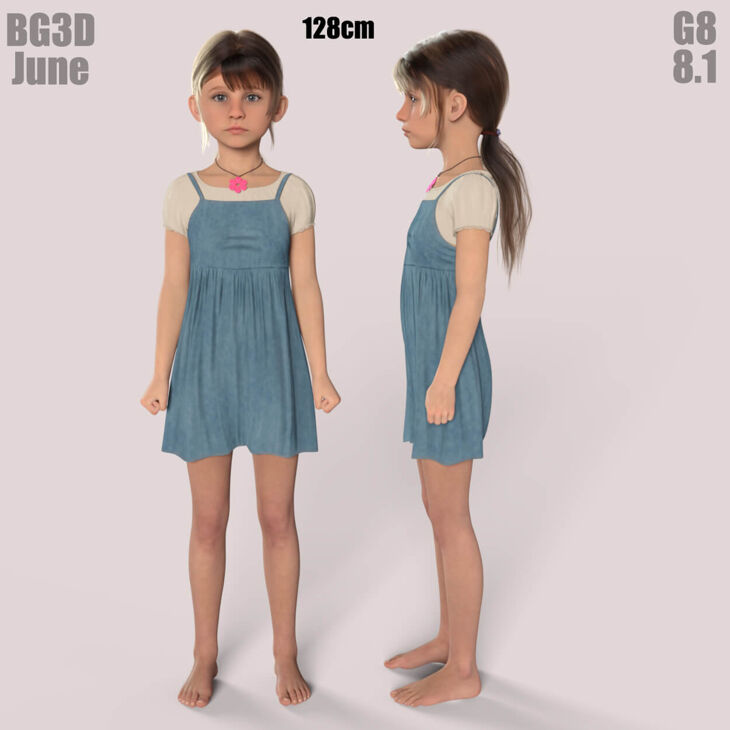
BG3D June NE for G8-8.1-G9 Premium Pack is a character created by BioGearZ3D and published on RenderHub. The package is distributed through the download mirrors below.
Updated 26-7-8: The G9 version was fixed with unlinked JCMs in the shoulder. No other changes were made. Just replace the old ones.
G8 VERSION INFO:
NOTE: June is NOW available to the Genesis 8 Female Figure with my EXCLUSIVE G8 Bonus Navel Geograft, G8 PerfectNavel v1.0. There will be a Premium Pack available as well for both G8 and G9 platforms in my store as well, so please head over to my store for quick access to these option!
DESCRIPTION:
Greetings! My specially crafted character June is now available for the G8 character with my included Naval Geograft. June G8F/8.1 comes in 2 versions, the BASE and Navel Edition versions.
You now have the option to use either the NE version or the base version, separate JCMs were developed to accommodate the two versions. This gives the buyer more options if they wish to use a separate skin instead on the non-navel version.
Basic Navel Edition:
I have created a separate UV for the G8 Perfect Navel (v1.0). This will allow the creator to manually create new skins for the Navel if the buyer knows how to use the DAZ transfer tool, and fix the seams in an editor. For the moment i am working on a script that will allow the user the ability to transfer the skin more easily. Unlike the G9 version, where I had to add geometry, the G8 version I had to remove and then re-add geometry. In future addition I will rework this, if the need arises.
So, for the moment, the G8 version will work with other G8 characters, but the buyer will need to make the adjustments to be able to use on other G8/8.1 Females to work correctly. I wanted to release these characters now, but i will be including a HOW-TO PDF at a later date to teach others to use the DAZ built-in texture transfer tool; albeit, they will still need to fix the textures with an editor. With the provided TransferUV I made it simple to correct these seams.
Please read the included documents for proper usage and limitations for the included geograft.
———————————————————————————
Basic Knowledge:
As with all my characters, they are based around the Joint Correction Morphs (JCMs), that help the buyer utilize the character without worrying about bad bends. Also, when making the JCMs, I make them easier to use with collisions so clothing will not clip through limbs when bends are closer to the body. Specifically, the Shins are Keyed JCMs!! Meaning they will start their bend cycle once the shin is closer to the back of the thigh (Bending the Shins all the way), giving a more realistic feel and look!
I take no short cuts in quality. I have taken the hard work out of corrections for you, so pose and get rendering quickly!!
The JCMs are baked into the Body or Head for their individual area morphs/bends to work correctly.
———————————————————————————
IMPORTANT NOTES:
I have included 4 Main Preloads as this will load any character seamlessly. These Preloads will get you started quickly! I have already provided the Preloads with each body part highlighted as a Favorite. ONCE the Preload is loaded, select the Figure, go to the Parameters Tab and Select Favorites. The Presets for both Genesis 8 and 8.1 Female will load the Scaling only.
NOTE: All key JCM’s are tied into the Base Body, it is best to at least have the body dialed in above 60% for minimal use for JCM realism if you like to mix your own figure.
Once one of the presets are dial in, there are a few manual dials for you to choose from. So if you load the PRESET, in Parameters TAB ALL KEY MORPHS will be in your favorites, so select Favorites in your parameters tab and you will see everything you need to get running quickly and adjust what you like on the fly!
I have provided a couple of Manual Shaping Morphs to be utilized at the users command. Including one of the most important, for the FEET, this presets should be dialed to the same settings as the Body Dial Setting. I have provided a crucial (
Specifications
- Source: RenderHub
- File format: Daz Studio DUF
- Software / install: Daz Studio
- SKU: 352559
- Artist: BioGearZ3D
Download links for 7 mirrors are listed below.