dForce FV Soft Twin Bun Hair for Genesis 9
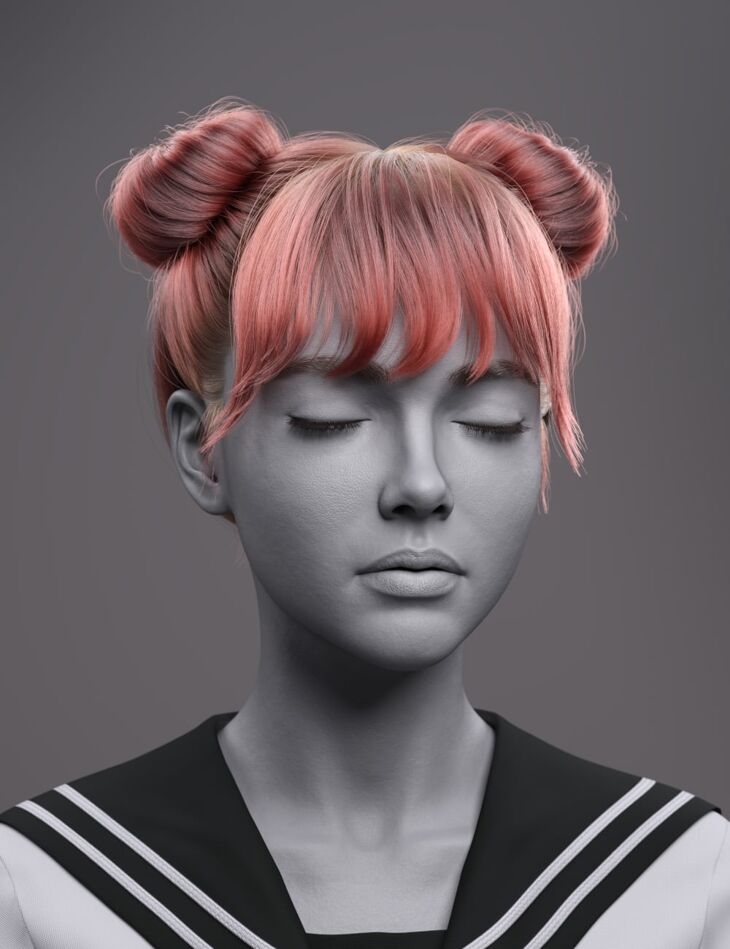
ForlornVoid released dForce FV Soft Twin Bun Hair for Genesis 9 on Daz 3D. Inside the archive you get 70 items, including dForce FV Soft Twin Bun Hair for Genesis 9, FV Soft Twin Bun Hair Base Genesis 9: EarFrontLeft Move Back-Front, EarFrontLeft Move Right-Left.
dForce FV Soft Twin Bun Hair for Genesis 9 combines playful styling with a soft, modern finish.
Featuring gently rounded twin buns and light, airy bangs, this hairstyle frames the face with a relaxed and natural flow while maintaining a clean and balanced silhouette.
Loose face-framing strands add subtle movement and realism, while the overall shape remains smooth and controlled, making it ideal for both casual and stylized looks.
Built with dForce strand-based hair and enhanced by the OmniHair Shader, it delivers realistic density, natural breakup, and responsive movement.
Shaping morphs and material presets allow you to easily adjust volume, bun size, softness, and messiness to suit your scene.
What’s included
- dForce FV Soft Twin Bun Hair for Genesis 9
- FV Soft Twin Bun Hair Base Genesis 9: EarFrontLeft Move Back-Front
- EarFrontLeft Move Right-Left
- EarFrontLeft Size Back-Front
- EarFrontRight Move Back-Front
- EarFrontRight Move Left-Right
- EarFrontRight Size Back-Front
- Forehead Depth In-Out
- Forehead Width In-Out
- HeadLeft Width In-Out
- HeadRight Width In-Out
- Head Depth In-Out
- Head Height In-Out
- Head Scale In-Out
- Head Size In-Out
- Head Width In-Out
- Neck Depth In-Out
- Neck Width In-Out
- Included Morphs: Bangs ClumpShape Root-Tip
- Bangs Length Shorter-Longer
- Bangs Noise Less-More
- Bangs Volume Less-More
- BangsFront Move Out
- BangsLeft Move Out
- BangsRight Move Out
- Base ClumpShape Root-Tip
- Base Noise Less-More
- BaseStrays Move In-Out
- BunLeft Move Out
- BunLeft Size Less-More
- BunRight Move Out
- BunRight Size Less-More
- BunStrays Move In-Out
- EarsFront Volume Less-More
- Neck Volume Less-More
- Supported Shapes: Other Shapes may be supported in Daz Studio by Auto-follow
- Materials: FV STBH G9 Black 01
- FV STBH G9 Black 02
- FV STBH G9 Black 03
- FV STBH G9 Black 04
- FV STBH G9 Brown 01
- FV STBH G9 Brown 02
- FV STBH G9 Brown 03
- FV STBH G9 Brown 04
- FV STBH G9 Brown 05
- FV STBH G9 Red 01
- FV STBH G9 Red 02
- FV STBH G9 Red 03
- FV STBH G9 Blond 01
- FV STBH G9 Blond 02
- FV STBH G9 Blond 03
- FV STBH G9 Blond 04
- FV STBH G9 Blond 05
- FV STBH G9 White 01
- FV STBH G9 White 02
- FV STBH G9 White 03
- FV STBH G9 Color Random 01
- FV STBH G9 Color Random 02
- FV STBH G9 Color Random Off
- FV STBH G9 Gloss Default
- … and 10 more items in the archive.
Specifications
- Source: Daz 3D
- Compatible figures: Genesis 9
- Requires: Genesis 9 Starter Essentials
- File format: DUF
- Software / install: Daz Connect DIM Manual Install
- SKU: 116152
- Artist: ForlornVoid
It is available through 7 mirrors. Registration is free and takes a moment.