dForce Juneau Hair for Genesis 9
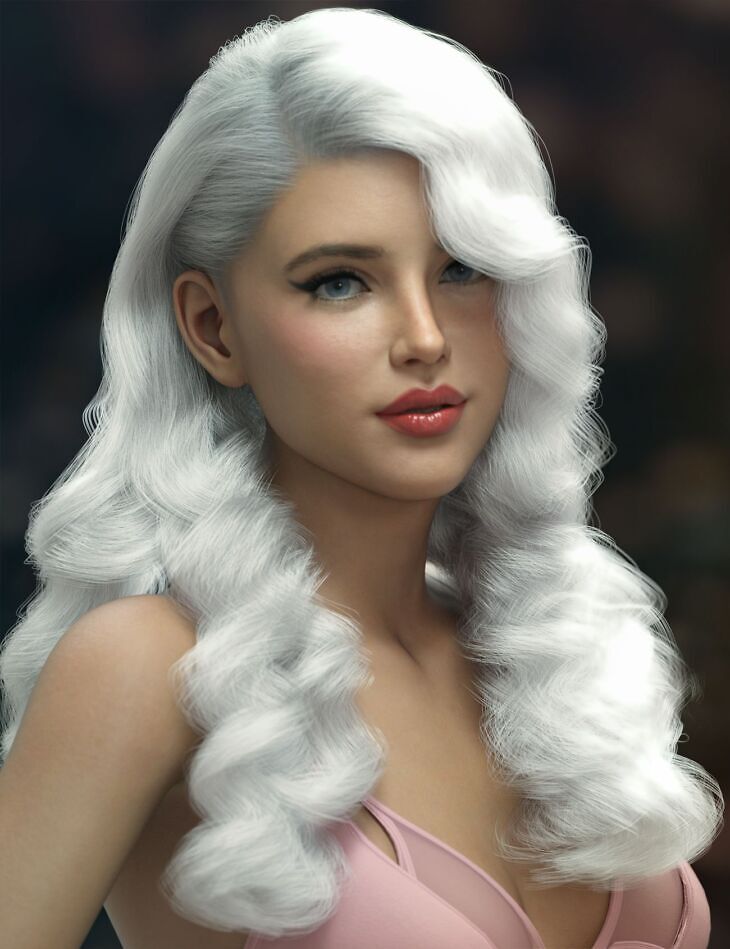
From AprilYSH comes dForce Juneau Hair for Genesis 9, a hair asset, available on Daz 3D. The download holds 128 items, among them dForce Juneau Hair For Genesis 9 dForce Strands Style and Move: Face Curl Long, Face Curl Wide, Back.
dForce Juneau Hair is a morphing dForce strand based model of long, barrel curls with vintage styling. The hair is fitted for Genesis 9 (.DUF) with auto-conforming custom morphs for Daz Original characters. The dForce hair strands are grown on a skull cap “scalp” base which is fitted for Genesis 9 and auto-follows most character head shapes. The strands follow the head, neck, and chest movements, as well as having 4 custom bones for posing. Style and Movement dial sliders help fit your figure poses beyond the sample hair presets provided. Simulation to drape the hair is enabled with dForce. Iray OmniHair, Iray Blended Dual Lobe, and 3Delight UberSurface material presets are included. The tints may be modified by changing the surface colors of the hair. Characters, clothing, and environment not included. Please see notes below for “Additional Products used in Promo Images.”
What’s included
- dForce Juneau Hair For Genesis 9 dForce Strands Style and Move: Face Curl Long
- Face Curl Wide
- Back
- Forward
- Left
- Right
- Length
- Spread Lift
- Spread Sides
- LBack Before Shoulder
- LBack Bend
- LBack Length
- LBack Side-Side
- LBack Spread Lift
- LBack Spread Sides
- LBack Twist
- RBack Before Shoulder
- RBack Bend
- RBack Length
- RBack Side-Side
- RBack Spread Lift
- RBack Spread Sides
- RBack Twist
- LFront Behind Shoulder
- LFront Bend
- LFront Length
- LFront Side-Side
- LFront Spread Lift
- LFront Spread Sides
- LFront Twist
- RFront Behind Shoulder
- RFront Bend
- RFront Length
- RFront Side-Side
- RFront Spread Lift
- RFront Spread Sides
- RFront Twist
- dForce Strands Fit and Adjust: Adjust Back
- Adjust Breasts
- Adjust Face Left
- Adjust Front
- Adjust LBack
- Adjust LFront
- Adjust RBack
- Adjust RFront
- Adjust Shoulder Height
- “Scalp” Base Fit and Adjust: Adjust Crown Size
- Adjust Hairline
- Adjust Hairline Height
- Adjust Hairline Recede
- Adjust Head Size
- Ears Forward-Back
- Ears Height
- Ears Width
- Neck Height
- Neck In-Out
- Neck Width
- Temple 1
- Temple 2
- Temple 3
- … and 68 more items in the archive.
Specifications
- Source: Daz 3D
- Compatible figures: Genesis 9
- File format: DUF
- Software / install: Daz Connect DIM Manual Install
- SKU: 99945
- Artist: AprilYSH
It is available through 3 mirrors. Registration is free and takes a moment.