dForce Strand-Based Curly Mid Part Style Hair for Genesis 9 and Genesis 8 Female
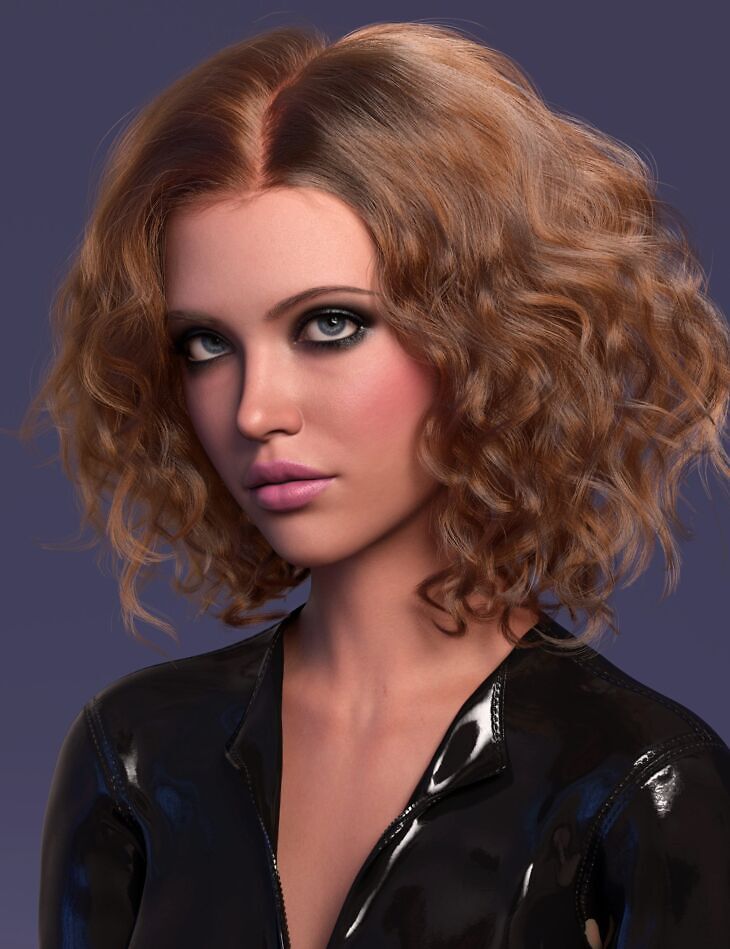
outoftouch released dForce Strand-Based Curly Mid Part Style Hair for Genesis 9 and Genesis 8 Female for Genesis 8 Female, Genesis 8.1 Female, Genesis 9 on Daz 3D. Inside the archive you get 58 items, including dForce Strand-Based Curly Mid Part Style Hair: Conforming Hair figure for Genesis 9, Conforming Hair figure for Genesis 8 Female, Included Morphs: Adjust-BackOut.
Get ready for the natural look with this shoulder length curly hairstyle for Genesis 9 and Genesis 8 Female utilizing Iray curves for smooth rendering and OmniHair shader for realistic looks. While this hair comes with dForce simulation features, you will notice that it simulates rather stiffly than following gravity. This is for the reason to keep the base hair styling. However you will get a set of morphs that you can use to bring the hair into position and then let simulation do the final touch. It comes with 30 hair colors to choose from. All options are optimized for Daz Studio Iray only and require at least Daz Studio version 4.22.
What’s included
- dForce Strand-Based Curly Mid Part Style Hair: Conforming Hair figure for Genesis 9
- Conforming Hair figure for Genesis 8 Female
- Included Morphs: Adjust-BackOut
- Adjust-CapEnlarge
- Adjust-CheekL
- Adjust-CheekR
- Adjust-Chest
- Adjust-Clothing-Offset
- Adjust-CollarL-X
- Adjust-CollarL-Y
- Adjust-CollarL-Z
- Adjust-CollarR-X
- Adjust-CollarR-Y
- Adjust-CollarR-Z
- Adjust-CollarsBack
- Adjust-ForeheadDepth
- Adjust-ForeheadHeight
- Adjust-ForeheadWidth
- Adjust-HeadL
- Adjust-HeadR
- Adjust-HeadSize
- Adjust-HeadSizeX
- Adjust-HeadSizeZ
- Adjust-HeadTop
- Adjust-HeadTopSize
- Adjust-JawL
- Adjust-JawR
- Adjust-NeckX
- Adjust-NeckZ
- Move-FrontLToL
- Move-FrontOutL
- Move-FrontOutR
- Move-FrontRToR
- Style-1
- Style-2
- Style-3
- Top-Flatten1
- Top-Flatten2
- Volume-L1
- Volume-L2
- Volume-L3
- Volume-L4
- Volume-R1
- Volume-R2
- Volume-R3
- Volume-R4
- Wind-FrontL
- Wind-FrontR
- Wind-L
- Wind-R
- Supported Shapes: Base Feminine
- Base Masculine
- Victoria 8
- Victoria 9
- Other Shapes may be supported in Daz Studio by Auto-follow
- Materials: 30 OmniHair Color Presets
- Presets: 2 IOR Presets
- 3 Specularity Presets
Specifications
- Source: Daz 3D
- Compatible figures: Genesis 8 Female, Genesis 8.1 Female, Genesis 9
- Requires: Genesis 9 Starter Essentials
- File format: DUF
- Software / install: Daz Connect DIM Manual Install
- SKU: 110725
- Artist: outoftouch
It is available through 7 mirrors. Registration is free and takes a moment.