DForce Tassel Dress
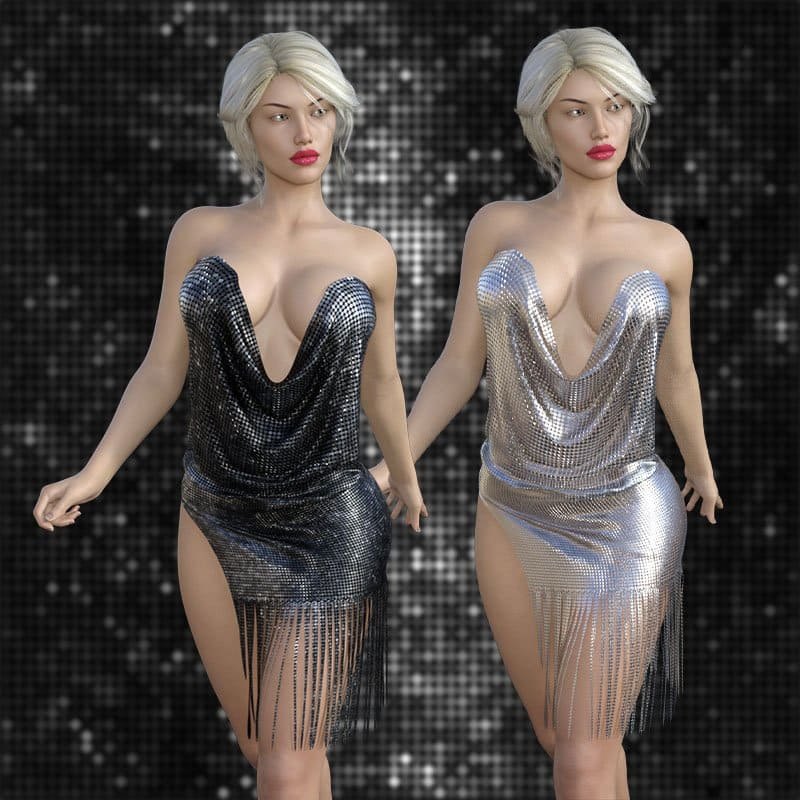
Looking for DForce Tassel Dress? You can download this Clothing pack free below — no account needed. Check the full details below to see if it fits your scene before you download.
If you are building a Daz Studio scene, you may also like Soft Ruffle Outfit for Genesis 9 Female and Bandeau Dress Outfit for Genesis 9. Browse more free downloads in Clothing.
How to install
- Unzip the file you downloaded.
- Copy the folders into your Daz Studio My Library folder (or install with Daz Install Manager if a .dsx file is included).
- Launch Daz Studio, load your figure, open the package from the Content Library and apply the presets described in the details below.
- If a preset does not show up, restart Daz Studio once so the library refreshes.
Download – no account needed
Download links below work as a guest. You do not need to create an account to download. If you plan to download often or the mirror slows down guests at busy times, you can optionally create a free account on the mirror for a higher daily limit — it only takes a minute.
Frequently asked questions
Is DForce Tassel Dress free to download?
Yes. The file below is free and you can download it directly from this page without paying anything.
Do I need an account to download?
No. Downloads work as a guest. Creating a free account on the mirror is optional and only helps if you want a higher daily limit.
How do I install it?
Unzip the file you downloaded and copy the folders into your Daz Studio My Library folder. If a .dsx file is included you can also install with Daz Install Manager, then restart Daz Studio once so the library refreshes.
Will it work with my setup?
This package is built for Daz Studio. Check the compatibility notes in the full details below before applying presets to a different figure or version.
You can also browse more free downloads in Clothing.
Original product description (from source)
DForce Tassel Dress comes from matteoio via RenderHub for Genesis 8 Female. The package is distributed through the download mirrors below.
Hot hot hot clubwear for Genesis 8 Female.
Morphs are-
ON FLOOR.dsf
SK SHOW BACK.dsf
SK SHOW FRONT.dsf
TOP L SHOW.dsf
TOP R SHOW.dsf
TOP SHOW BOTH.dsf
======================================================================
INSTRUCTIONS
======================================================================
Extract the zip file and copy content to Daz3d Library.
All Mats are IRAY.
On Floor \ morph – fit to none.
For Bend over or sitting -skirt up -use “Sit Sk Show” morph
Morph abbreviation-
SK-SKIRT
L-Left
R-Right
dForce-
Load Genesis 8 Female first and then load the dress on figure.
For the dForce to work properly.
Best Body Conforming Results to any body shape use
Frames to Simulate>Animated(Custom)
Under Timeline.
at 0 Frame, desired Pose and original body shape
at 10 or 15 Frame, Same Pose and desired body shape.
Simulate.
Poke Through,
Use smoothing and collision iteration to fix poke through.
If problem still persists,
>Play around by switching between “base” and “high resolution” under
Resolution Level found under
Parameter Settings of Genesis 8 Female.
Happy New Year
Cheers
Specifications
- Source: RenderHub
- Compatible figures: Genesis 8 Female
- File format: Daz Studio DUF
- Software / install: Daz Studio
- SKU: 65976
- Artist: matteoio
Download links for 5 mirrors are listed below.