Elathlaen Hair for Genesis 9
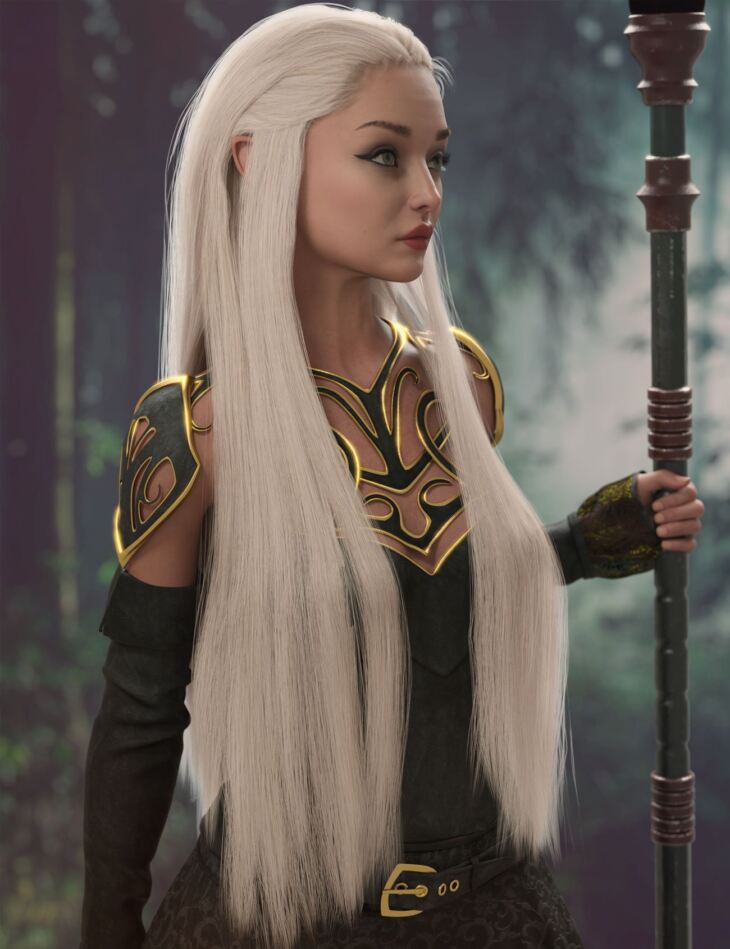
Elathlaen Hair for Genesis 9 is a hair asset that AprilYSH built; it is distributed through Daz 3D. The package ships 119 files, starting with Elathlaen Hair For Genesis 9 All: Breasts Larger, Breasts Smaller, Back.
Elathlaen Hair is a morphing, polygonal model of long straight hair with the front slicked back. The hair is fitted for Genesis 9 (.DUF) with auto-conforming custom morphs for Daz Original characters. The hair’s sections have an articulate rig consisting of 30 custom bones. Easy Pose ERC dial/sliders help fit your figure poses beyond the 14 sample pose presets. A dForce weight node is included with the hair so you may opt to use dForce cloth draping simulation to help settle the hair pose. Users may modify these dForce Simulation settings in the Surfaces pane. Iray and 3Delight diffuse color presets are included. You may modify the tints by changing the diffuse color of the hair. Characters, clothing, and environment not included. Please see below for additional products used in promo images.
What’s included
- Elathlaen Hair For Genesis 9 All: Breasts Larger
- Breasts Smaller
- Back
- Forward
- Left
- Right
- Length
- Frizz
- Spread
- ZThickness
- Back: BackLeft Before Shoulder
- BackLeft Bend
- BackLeft Length
- BackLeft Side-Side
- BackLeft Twist
- BackRight Before Shoulder
- BackRight Bend
- BackRight Length
- BackRight Side-Side
- BackRight Twist
- Front: FrontLeft Behind Shoulder
- FrontLeft Bend
- FrontLeft Length
- FrontLeft Side-Side
- FrontLeft Twist
- FrontRight Behind Shoulder
- FrontRight Bend
- FrontRight Length
- FrontRight Side-Side
- FrontRight Twist
- Fit and Adjust: Adjust Back
- Adjust Below Chest 1
- Adjust Below Chest 2
- Adjust Crown Size
- Adjust Ears Behind
- Adjust Ears Front
- Adjust FaceL
- Adjust FaceR
- Adjust Hairline
- Adjust Hairline Height
- Adjust Hairline Narrow
- Adjust Head Size
- Adjust Left
- Adjust Right
- Adjust Shoulder Height
- Adjust Shoulder Height Back
- Adjust Shoulder Height Front
- Ears Forward-Back
- Ears Height
- Ears Width
- Neck Height
- Neck In-Out
- Neck Width
- Temple 1
- Temple 2
- Temple 3
- Temple 4
- Temple 5
- Temple 6
- Poses and Presets: Usage Tips PDF
- … and 59 more items in the archive.
Specifications
- Source: Daz 3D
- Compatible figures: Genesis 9
- Requires: Genesis 9 Starter Essentials
- File format: DUF
- Software / install: Daz Connect DIM Manual Install
- SKU: 88862
- Artist: AprilYSH
The file is mirrored on 9 hosting services; a free account is required to download.