Pd Iray Shader Kit 1
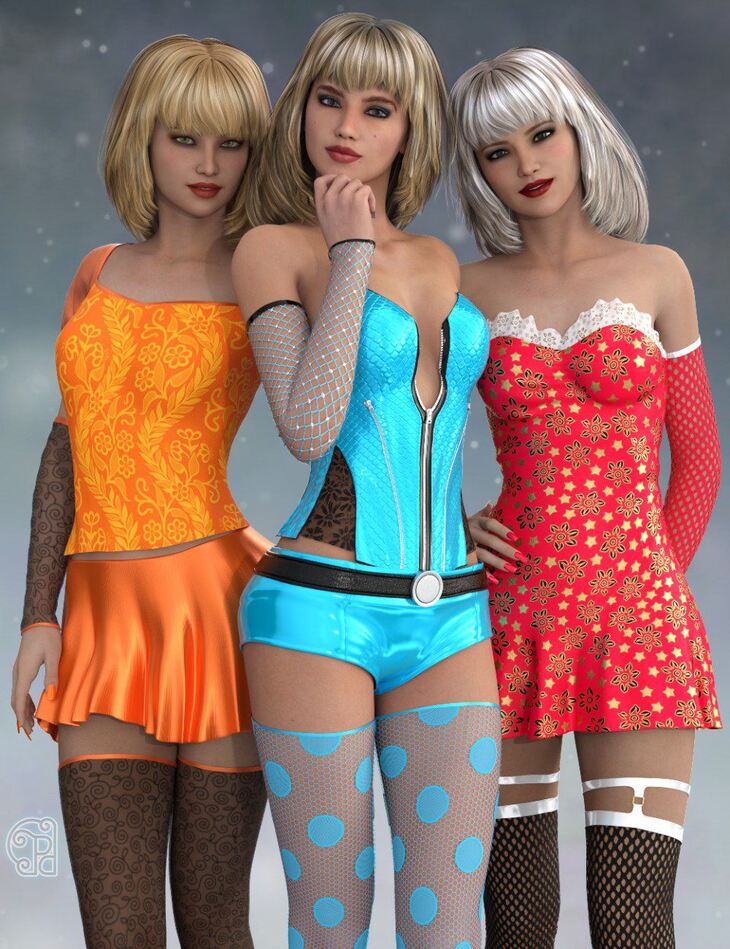
parrotdolphin released Pd Iray Shader Kit 1 on Daz 3D. The download holds 132 items, among them Pd Iray Shader Kit 1: PDISK1 + BASE – COTTON – KEEP IMAGES, PDISK1 + BASE – COTTON, PDISK1 + BASE – PVC – KEEP IMAGES.
With Pd Iray Shader Kit 1 you can create your own shaders with just a few clicks. Pd Iray Shader Kit 1 is a do-it-yourself shader kit for Iray rendering. All of the shader presets are based off the Daz 3D Iray Uber Base. You can create 1000’s upon 1000’s of different shaders with just a few simple clicks. There are Base Shaders, which you apply first. Then you can add a bump map to it or a color or both. And you can add other things like patterns, opacity settings and metallic overlays. For example, if you wanted a red, sheer silk you would double-click on a Silk Base Shader, then double-click on one of the red Base Color presets, then double-click on an Opacity setting. If you wanted a black PVC (or latex) you would double-click on the PVC Base Shader, then double-click on the black Base Color preset. If you wanted a green sport mesh, you would double-click on the Cotton Base Shader, then double-click on one of the green Base Color presets, then double-click on one of the Sport Mesh patterns. There’s endless possibilities. A handy script for scaling the texture size easily is included too. And there is also a short guide included.
What’s included
- Pd Iray Shader Kit 1: PDISK1 + BASE – COTTON – KEEP IMAGES
- PDISK1 + BASE – COTTON
- PDISK1 + BASE – PVC – KEEP IMAGES
- PDISK1 + BASE – PVC
- PDISK1 + BASE – SILK 1 – KEEP IMAGES
- PDISK1 + BASE – SILK 1
- PDISK1 + BASE – SILK 2 – KEEP IMAGES
- PDISK1 + BASE – SILK 2
- PDISK1 + BUMP – HEX
- PDISK1 + BUMP – LINEN
- PDISK1 + BUMP – SCALES
- PDISK1 + BUMP – SILK 1
- PDISK1 + BUMP – SILK 2
- PDISK1 + COLOR – BEIGE DARK
- PDISK1 + COLOR – BEIGE LIGHT
- PDISK1 + COLOR – BLACK
- PDISK1 + COLOR – BLUE 1 BRIGHT
- PDISK1 + COLOR – BLUE 1 DARK
- PDISK1 + COLOR – BLUE 1 LIGHT
- PDISK1 + COLOR – BLUE 2 BRIGHT
- PDISK1 + COLOR – BLUE 2 DARK
- PDISK1 + COLOR – BLUE 2 LIGHT
- PDISK1 + COLOR – BROWN DARK
- PDISK1 + COLOR – BROWN LIGHT
- PDISK1 + COLOR – GREEN 1 BRIGHT
- PDISK1 + COLOR – GREEN 1 DARK
- PDISK1 + COLOR – GREEN 1 LIGHT
- PDISK1 + COLOR – GREEN 2 BRIGHT
- PDISK1 + COLOR – GREEN 2 DARK
- PDISK1 + COLOR – GREEN 2 LIGHT
- PDISK1 + COLOR – GREY DARK
- PDISK1 + COLOR – GREY LIGHT
- PDISK1 + COLOR – ORANGE BRIGHT
- PDISK1 + COLOR – ORANGE DARK
- PDISK1 + COLOR – ORANGE LIGHT
- PDISK1 + COLOR – PINK 1 BRIGHT
- PDISK1 + COLOR – PINK 1 DARK
- PDISK1 + COLOR – PINK 1 LIGHT
- PDISK1 + COLOR – PINK 2 BRIGHT
- PDISK1 + COLOR – PINK 2 DARK
- PDISK1 + COLOR – PINK 2 LIGHT
- PDISK1 + COLOR – PURPLE BRIGHT
- PDISK1 + COLOR – PURPLE DARK
- PDISK1 + COLOR – PURPLE LIGHT
- PDISK1 + COLOR – RED 1 BRIGHT
- PDISK1 + COLOR – RED 1 DARK
- PDISK1 + COLOR – RED 1 LIGHT
- PDISK1 + COLOR – WHITE
- PDISK1 + COLOR – YELLOW BRIGHT
- PDISK1 + COLOR – YELLOW DARK
- PDISK1 + COLOR – YELLOW LIGHT
- PDISK1 + CUTOUT VALUE 0.00 – INVISIBLE
- PDISK1 + CUTOUT VALUE 0.25
- PDISK1 + CUTOUT VALUE 0.50
- PDISK1 + CUTOUT VALUE 0.75
- PDISK1 + CUTOUT VALUE 1.00 – KEEP MAP
- PDISK1 + CUTOUT VALUE 1.00 – NO MAP
- PDISK1 + METALLIC COLOR – COPPER
- PDISK1 + METALLIC COLOR – GOLD
- PDISK1 + METALLIC COLOR – SILVER
- … and 72 more items in the archive.
Specifications
- Source: Daz 3D
- File format: DUF
- Software / install: Daz Connect DIM Manual Install
- SKU: 22986
- Artist: parrotdolphin
It is available through 5 mirrors. Registration is free and takes a moment.