Texture Booster and Shader Converter
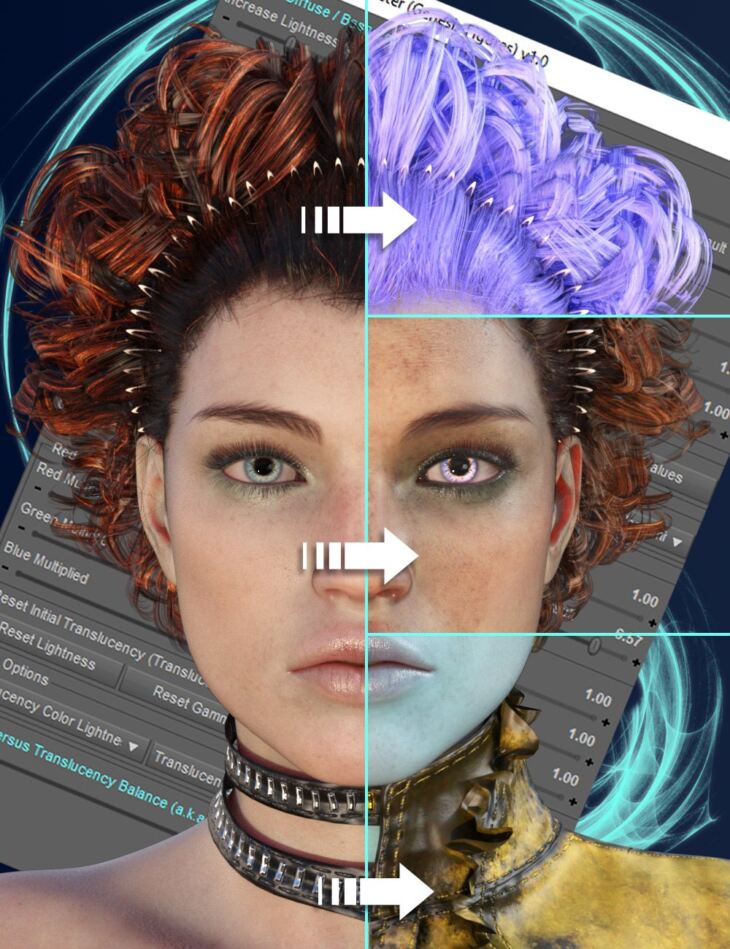
Texture Booster and Shader Converter is a tool created by V3Digitimes and published on Daz 3D. The package ships 11 files, starting with Texture Booster, 01 General Script (.dse) V3DTBD Documentation, 05 Scripts for All Genesis Figures: (.dse) V3DTBG Booster For Genesis Figures.
Texture Booster and Shader Converter is a suite of tools allowing you to control and enhance the look of your Genesis figures of any Generation, as well as the look of any selected surfaces of your scene. The booster scripts use clear dials allowing you not only to go fast and to understand clearly what you’re doing, but also to reach easily the result you want with virtually unlimited possibilities. The full product associates tools developed for any generation of Genesis figures and tools acting on selected surfaces. This way you will be able to adjust to your liking all your figures, outfits, props, hair, irises, teeth, etc Have you ever thought that your figure, hair, outfits, or environments would look better if their colors were lighter, darker, or even more detailed, or were using another tone, tint, or hue? Have you ever struggled to adjust the look of your figures or of your other scene surfaces, and eventually gave up because it would be too long, too complex, or too fastidious to enhance everything? These times are over! Now with Texture Booster and Shader Converter, you will find the fastest, easiest, and most intuitive way to control and enhance the look of your figures, wearables, and props, browsing the widest range of accessible skin – and other surfaces – so far, from realistic skin tones to fantasy ones, from classical surfaces tones to super colored ones. The two Texture Booster main scripts, one for Genesis figures, and the other one for any selected surfaces, work both on Iray Uber and PBRskin figures, wearables, and props. If the surfaces you want to optimize don’t natively use those shaders – which can occur for too old content – you will find scripts to convert, with many options, any Genesis figure of any generation, as well as the wide majority of their wearables and of the scene props, either to Iray Uber or to PBRSkin, in order to unleash for all your scenes the full power of the Texture Booster. Concerning the booster script in itself, the two most intuitive properties you will most often act on are the lightness and tone, as well as tint and hue thanks to the corresponding dials available both for Base Color and for Translucency Color. The lightness dial will act directly as a texture modifier, allowing you to have lighter or darker skins without any loss of detail. The tint or hue control is made by unlimited Red, Green, and Blue dials allowing you to work more efficiently in terms of color control. The Gamma dial is here mainly to be used in conjunction with the lightness dial in order to boost the texture map details (so the surface details) or to make the colors stronger. The way the booster works is super intuitive, for instance for figures: The figure is too dark? Increase the Lightness dials. The texture details are not visible enough? Increase Gamma and Lightness dials! Do you feel that the skin is too reddish? Lower the Red dials! Do you want a blue fantasy figure? Push the Blue dials and lower the other color dials! Using lightness and unlimited color dials will allow you to reach the skin lightness and tints or hues you want in seconds without altering skin details, and in addition, using the gamma in conjunction with the lightness will allow you to visually tan and suntan the figure, or to enhance the skin and texture details and richness. Lightness and Red, Green, and Blue dials are unlimited float properties, meaning that they have no upper limits, allowing you to have more blue even if the blue component was initially at its maximum: the booster will adjust the blue component limit to a value higher than its natural limit, allowing you to increase or decrease the colors and lightness of your Base Color and Translucency Color maps without any limitations. Gloss is also an important part of the final look of your figure. This is why you will also find a smart gloss script, adjusting both to Iray Uber and PBRSkin, allowing you to control this gloss very efficiently, in an unlimited way
What’s included
- Texture Booster
- 01 General Script (.dse) V3DTBD Documentation
- 05 Scripts for All Genesis Figures: (.dse) V3DTBG Booster For Genesis Figures
- V3DTBG Booster Options For Genesis Figures
- V3DTBG Control Gloss Bump Roughness For Genesis Figures
- V3DTBG Transfer Skin Settings To Geograft
- V3DTBG Converter For Genesis Figures
- 04 Scripts for Any Selected Surfaces: (.dse) V3DTBS Booster For Selected Surfaces
- V3DTBS Converter For Selected Surfaces
- V3DTBS Gloss Bump Roughness For Selected Surfaces
- V3DTBU Texture Splitter For Selected Surfaces
Specifications
- Source: Daz 3D
- File format: DUF
- Software / install: Daz Connect DIM Manual Install
- SKU: 93586
- Artist: V3Digitimes
The file is mirrored on 9 hosting services; a free account is required to download.